
Conquest Brain - Content Automation
The operating system behind a Spanish-language documentary YouTube channel: standing rules, templates and Python tools that take an idea through research, script, assets, edit and publication, with a human decision at every gate.
Role
Design & Development
Stack
Python, FFmpeg, Whisper
Workflow
13 gated stages
Type
Automation system
1. Overview
A documentary is a long chain of repeatable decisions, and most of them can be made mechanical. Is the idea eligible? Does every claim have a source? Do we hold the rights to that footage? Is the edit in sync with the voice? Conquest Brain turns that chain into a documented, gated workflow: Python does the mechanical work at zero token cost, and the system stops at every decision that needs a person.
It is a repository of rules, templates, per-episode folders and 34 Python tools, driven from a local dashboard. It has been built in about four weeks, with 166 commits, and it is already carrying real episodes through production.
⚠️ The Problem
A small team producing sourced, journalistic documentaries needs four things at once, and each one fails quietly when done by hand:
- Editorial rules that do not drift between episodes or between people
- A repeatable path from an idea to a published 4K video
- An audit trail for every source and every image right
- Low compute and token cost when an AI agent is in the loop
✓ The Solution
Plain files as the database, gates as the process. Every stage produces a file, a review page lets a person decide, and a gate engine advances the episode only when that decision is signed. Judgement work is queued for an AI agent; everything else runs as ordinary Python.
2. Design Principles
Files are the database: Markdown, CSV, TSV and JSON that people and agents can read, diff and version in git.
A human at every judgement: Gates have three states (open, exported, signed), and any gate can be signed by one person.
Mechanical work costs nothing: Anything Python can do never reaches an LLM, and the dashboard server spends no tokens.
Warn, do not block: Audits report problems loudly but only genuinely uncovered work blocks a render.
Resumable by default: Long jobs run in chunks so a crash or a sleeping laptop loses minutes, not hours.
3. Architecture
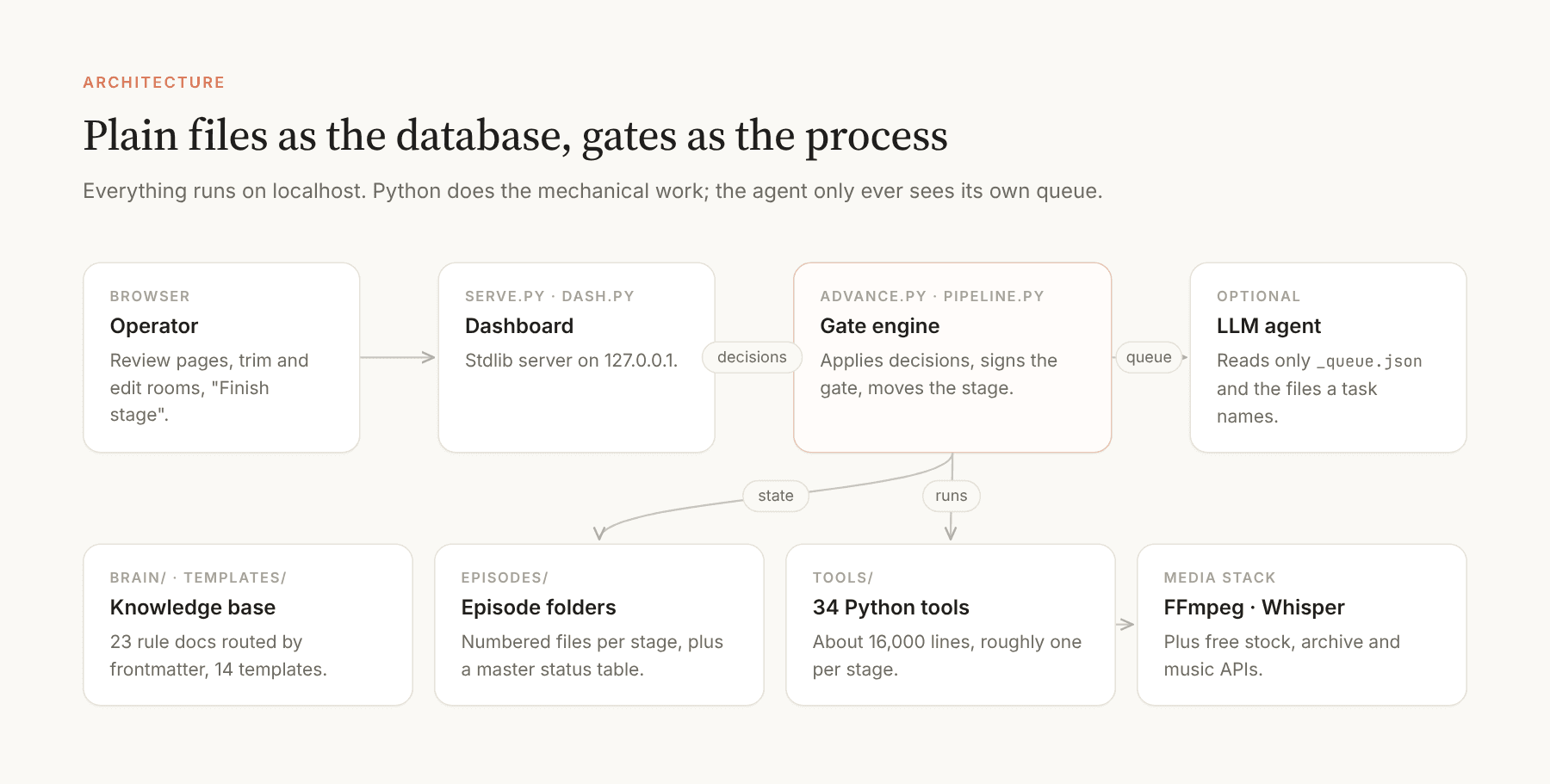
The system has six layers, from the rules that never change to the media stack that renders the video.
Knowledge base: 23 numbered documents with YAML frontmatter (summary, stage, read_when) and a routing index, so an agent loads one to three of them instead of all.
Templates: 14 fill-in templates, one per stage.
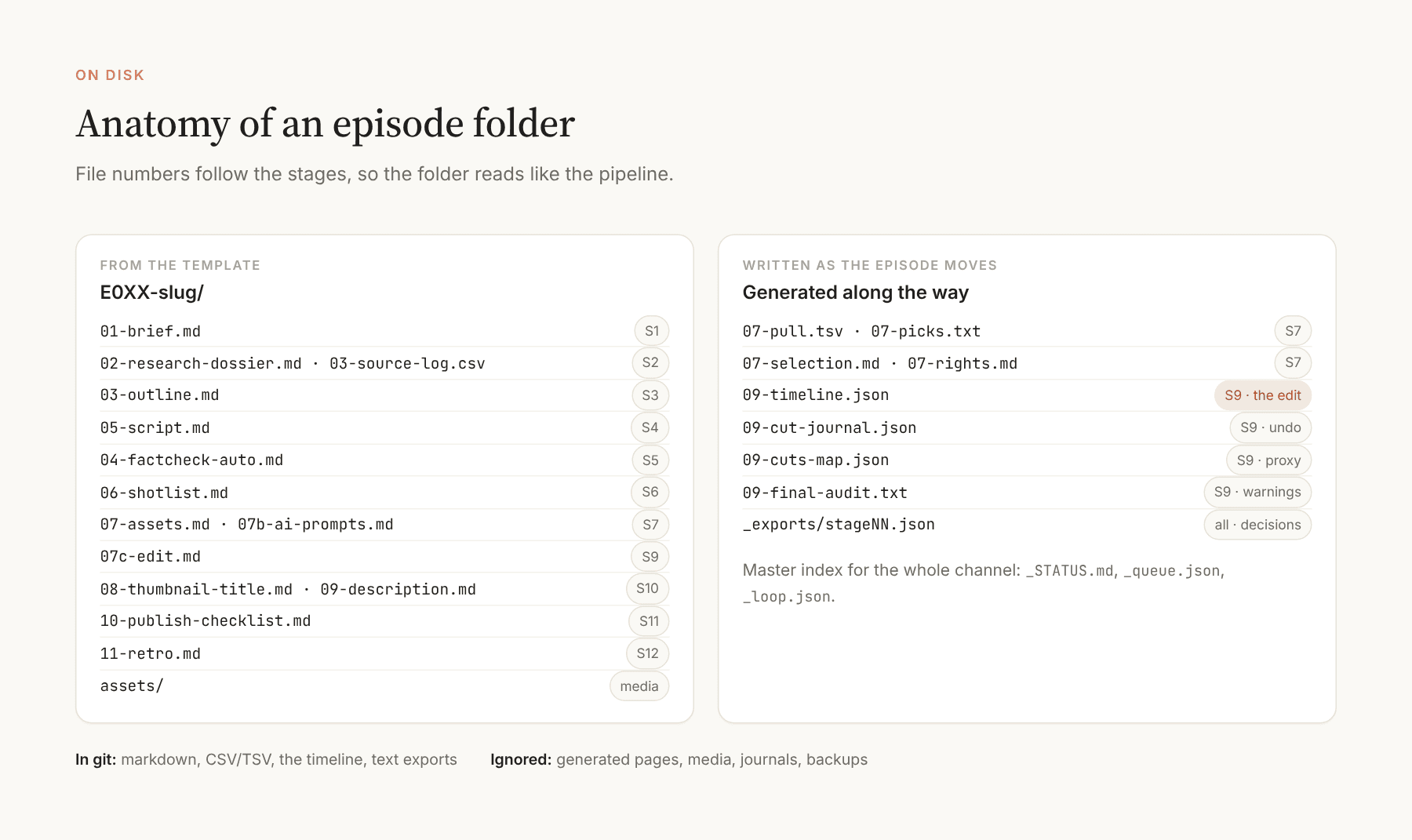
Episode folders: One folder per episode with 14 numbered files whose numbers mirror the stages, plus a master status table and an agent task queue.
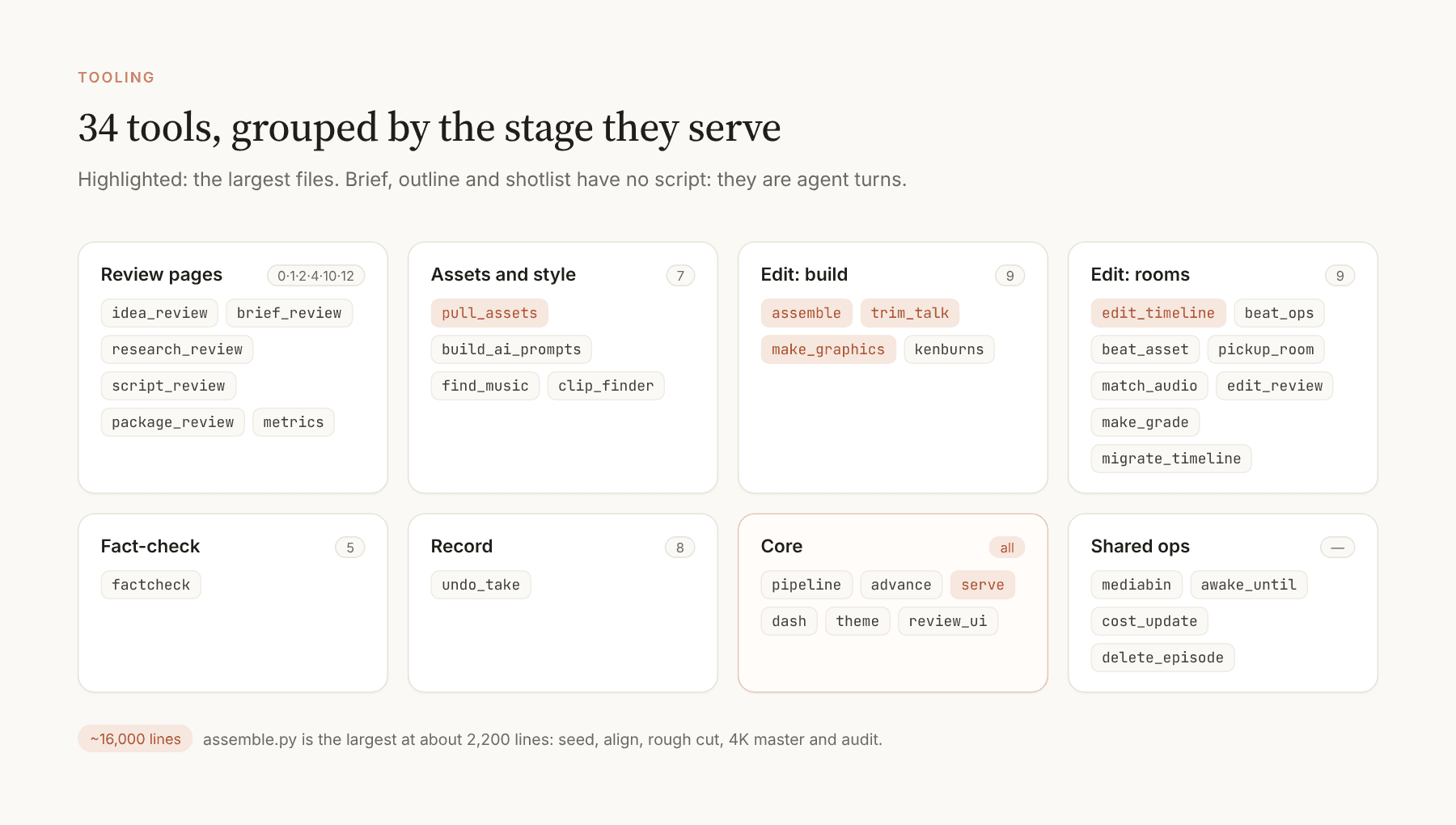
Tools: 34 Python files, about 16,000 lines, roughly one script per stage. A single pipeline manifest is the source of truth for every stage.
Dashboard: A stdlib HTTP server on localhost that serves every generated review page and turns each Finish button into a decision that the gate engine applies.
Media stack: FFmpeg, faster-whisper for word timestamps, and free stock, archive and music APIs with strictly licensed sources.
How data flows
A review page exports decisions as a text file. The server stashes them, the gate engine applies them (mechanically in Python, or by queuing a task for an agent), advances the stage, and regenerates the dashboard. The master status table is plain markdown, so the whole state of the channel is one file you can read.
4. The Pipeline
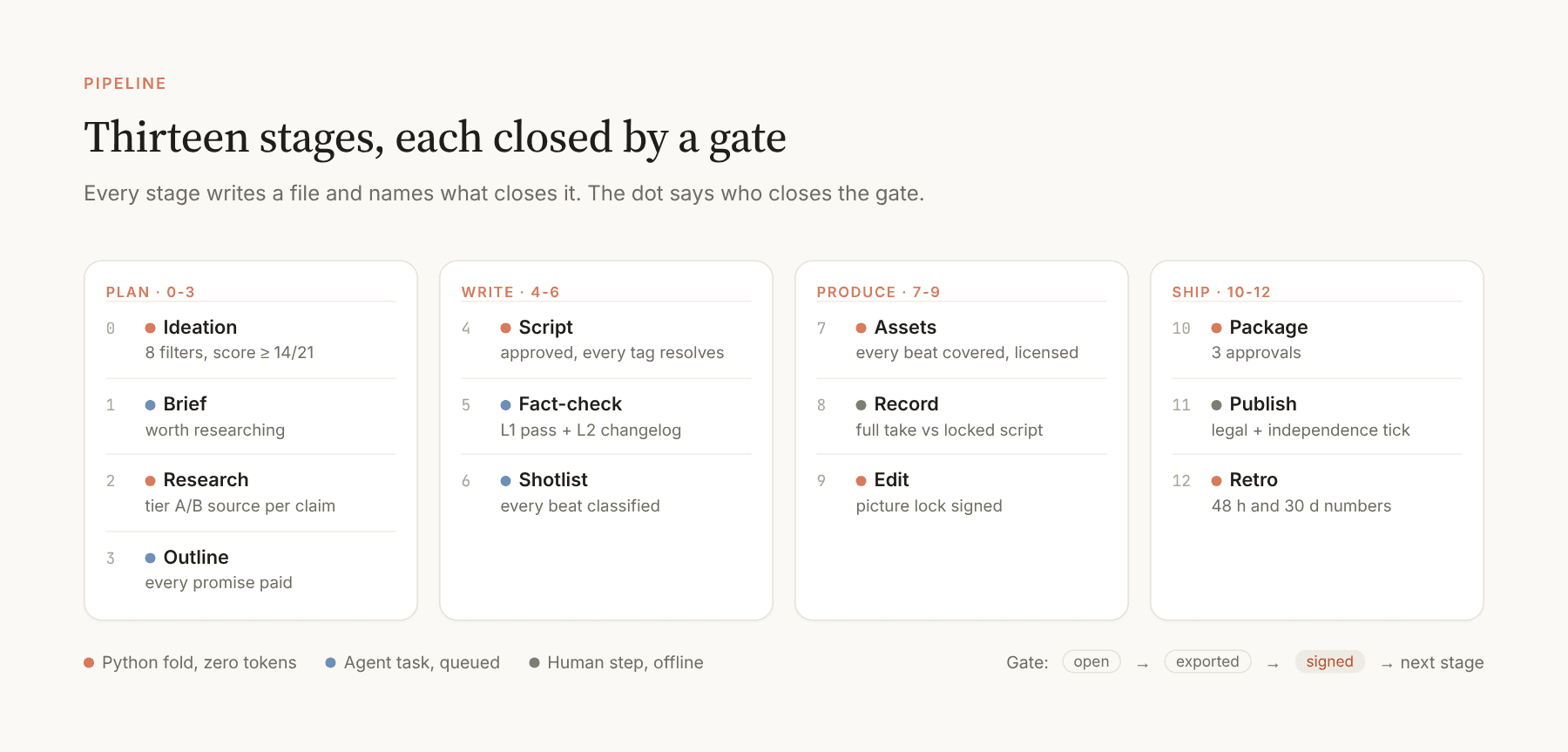
Thirteen stages, from ideation to a retrospective with real numbers. Each one names what it produces, which tool and review page serve it, what closes its gate, and who acts. Roughly one script serves each stage.
5. Stage by Stage
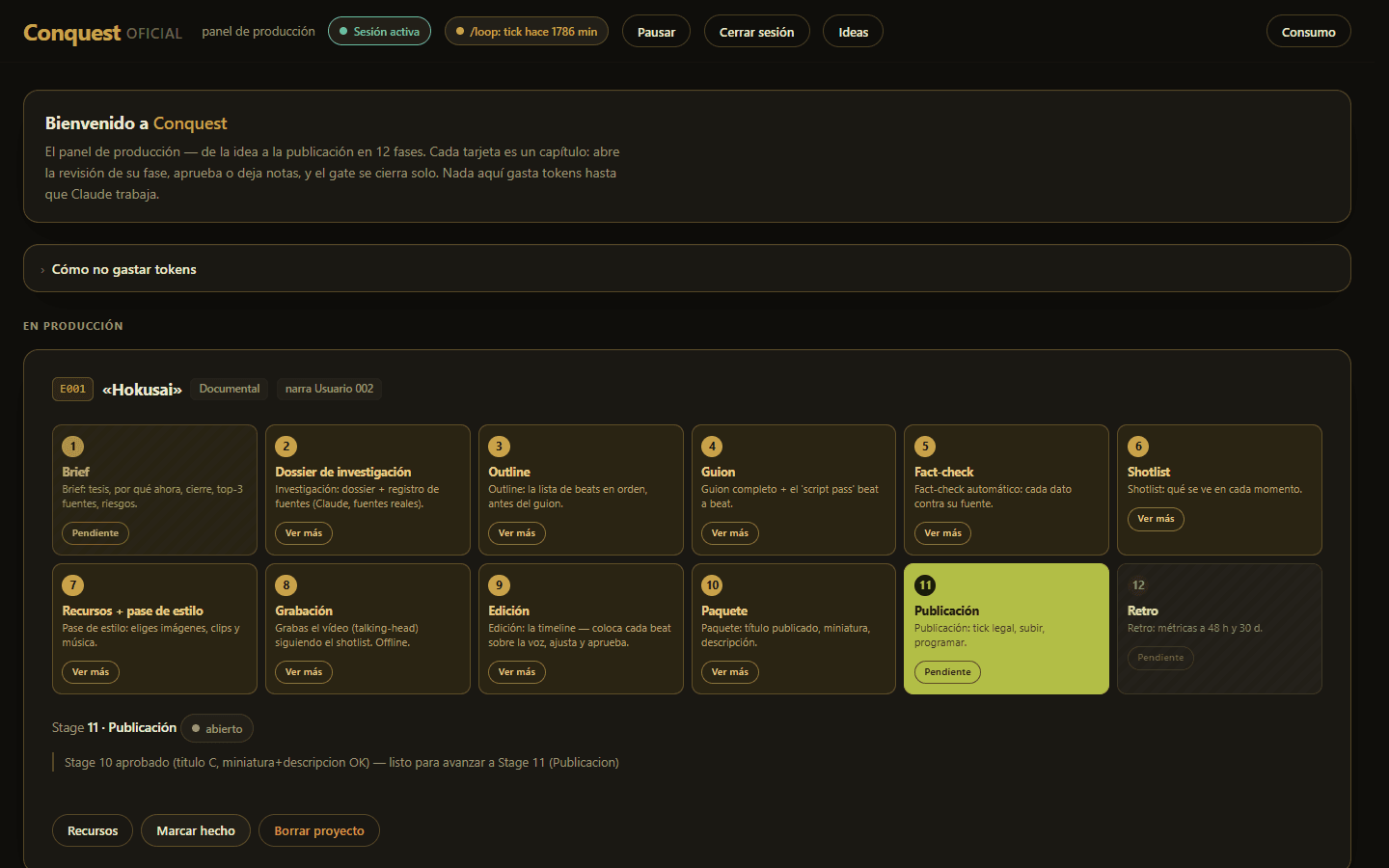
Every review page is generated, self-contained HTML with no external dependencies, served by the local dashboard. The interface is in Spanish because the channel is. The screenshots below are real pages from episodes in production, taken read-only.
The dashboard
One card per episode with a stage strip. Every chip explains itself in plain language and opens whatever that stage produced, and the same page shows whether the agent loop is alive and how much LLM usage each stage costs.
Stage 0 · Ideation
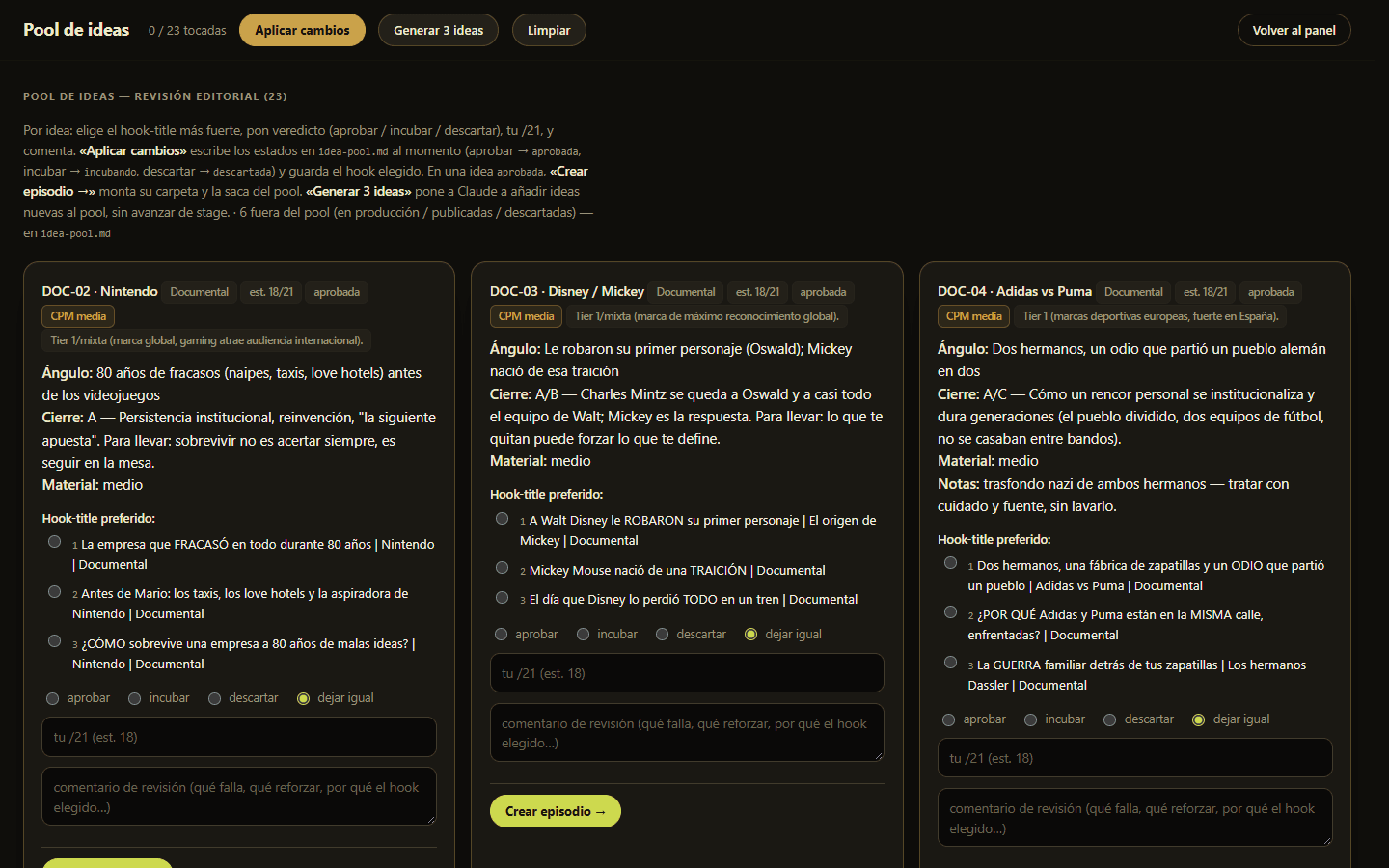
Ideas are scored against eight eliminatory filters that must all be yes, and seven criteria scored from zero to three. Twenty-one points is the maximum, fourteen passes, ten to thirteen incubates and anything lower is discarded. Two format tracks are defined by their rights regime rather than by topic: a documentary track that prefers public-domain material, and an essay track built on short, capped clips of a film and its reception. Approving an idea creates the next episode folder with its brief prefilled.
Stages 1 and 2 · Brief and research
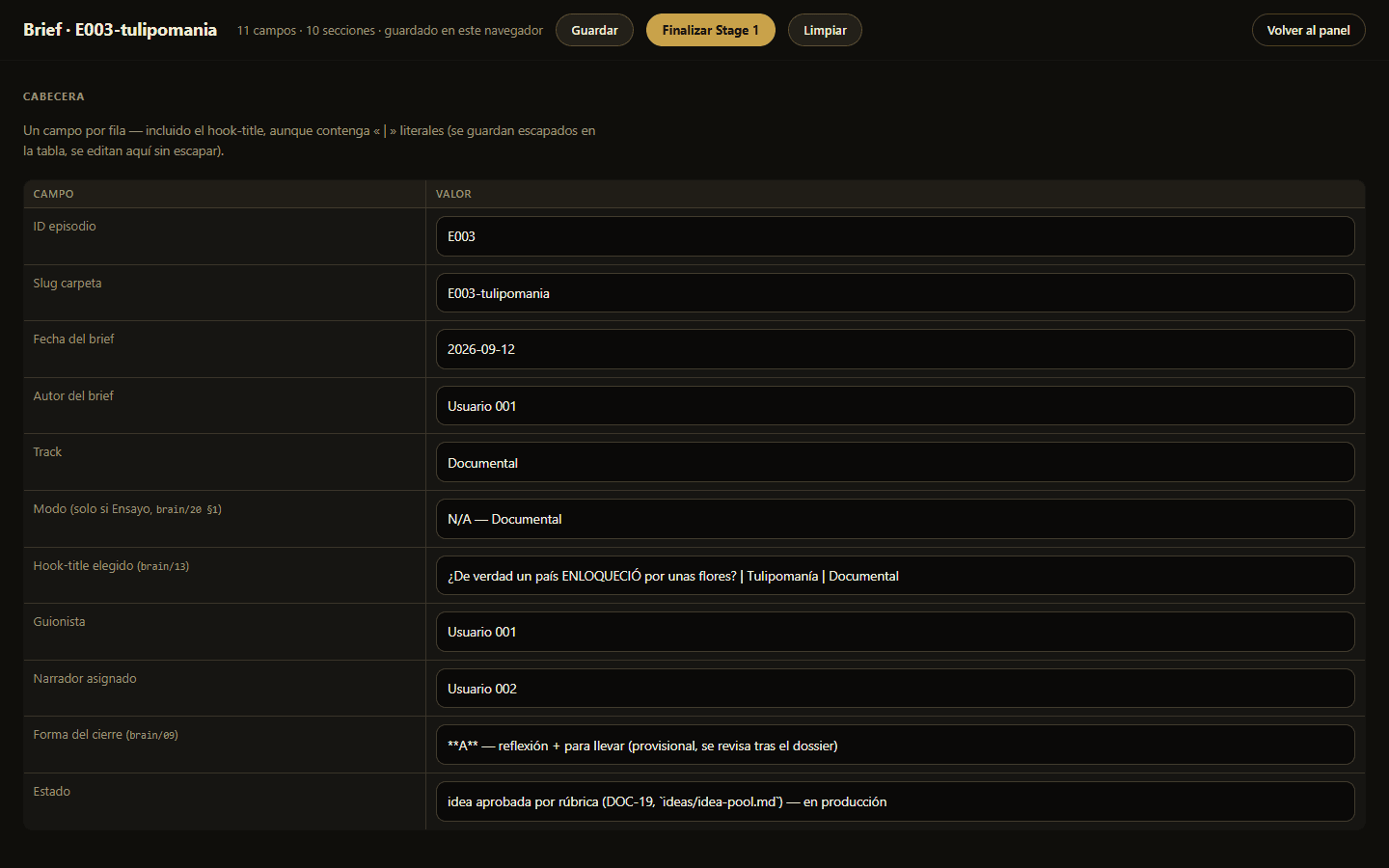
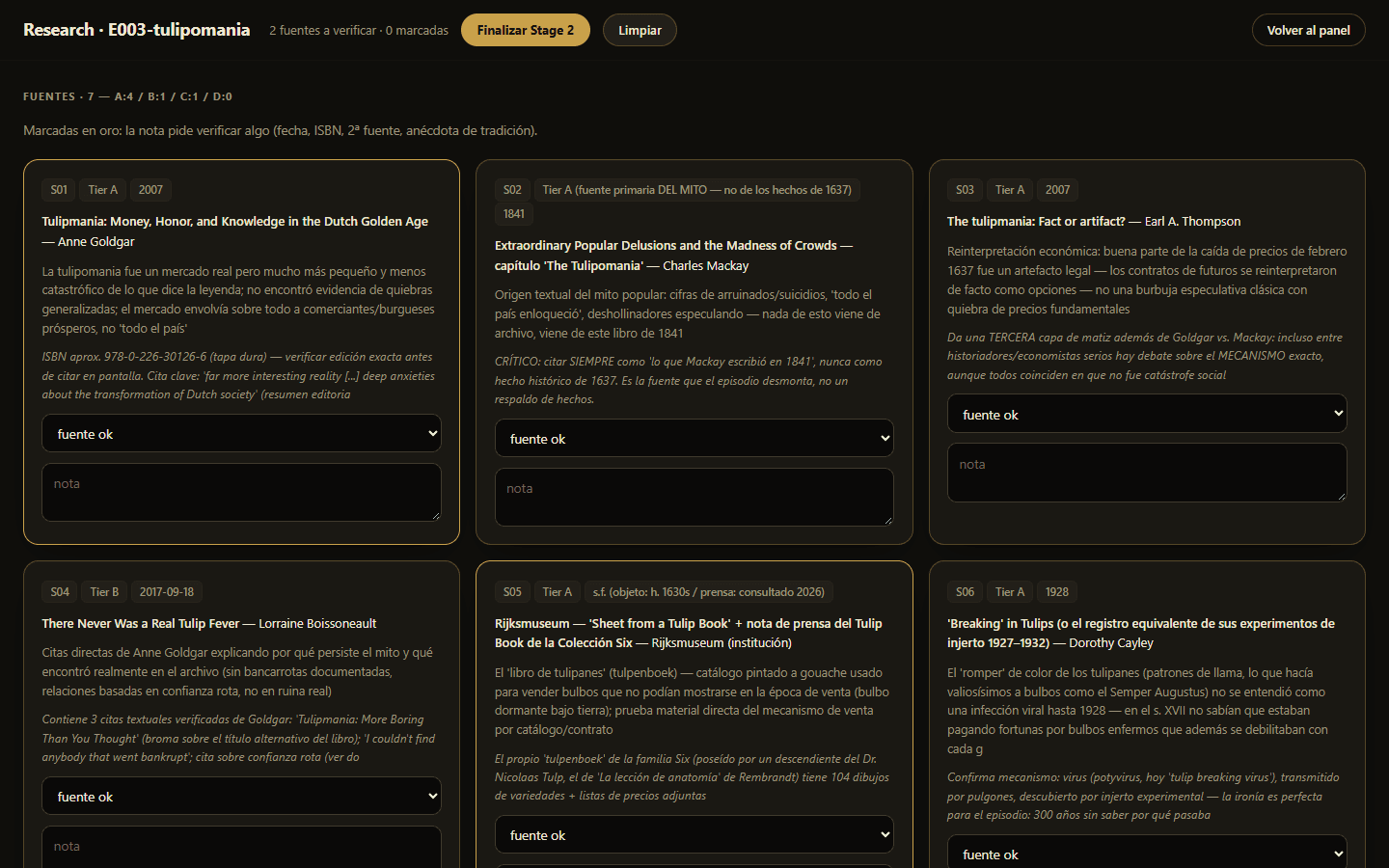
The brief is an editable header table, one field per row. The research dossier lists each source as a card with its reliability tier, its year and a verify note, and the gate demands at least one top-tier or second-tier source behind every load-bearing claim.
Stage 4 · Script
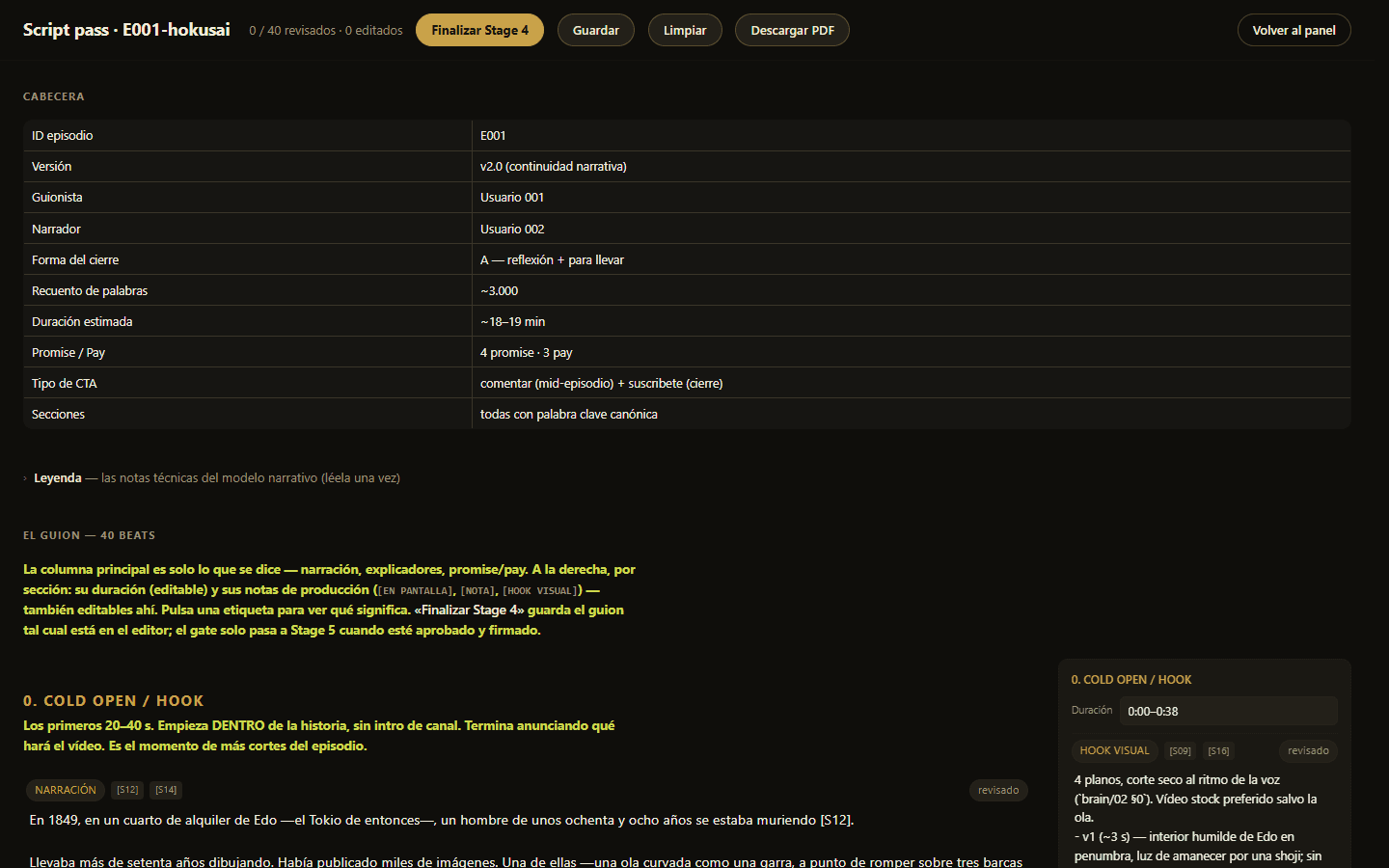
The script is written in a direct editor with a header table and one row per beat. The gate needs an approval with the reviewer's name and every citation tag in the text to resolve to a source.
Stage 5 · Fact-check in two layers
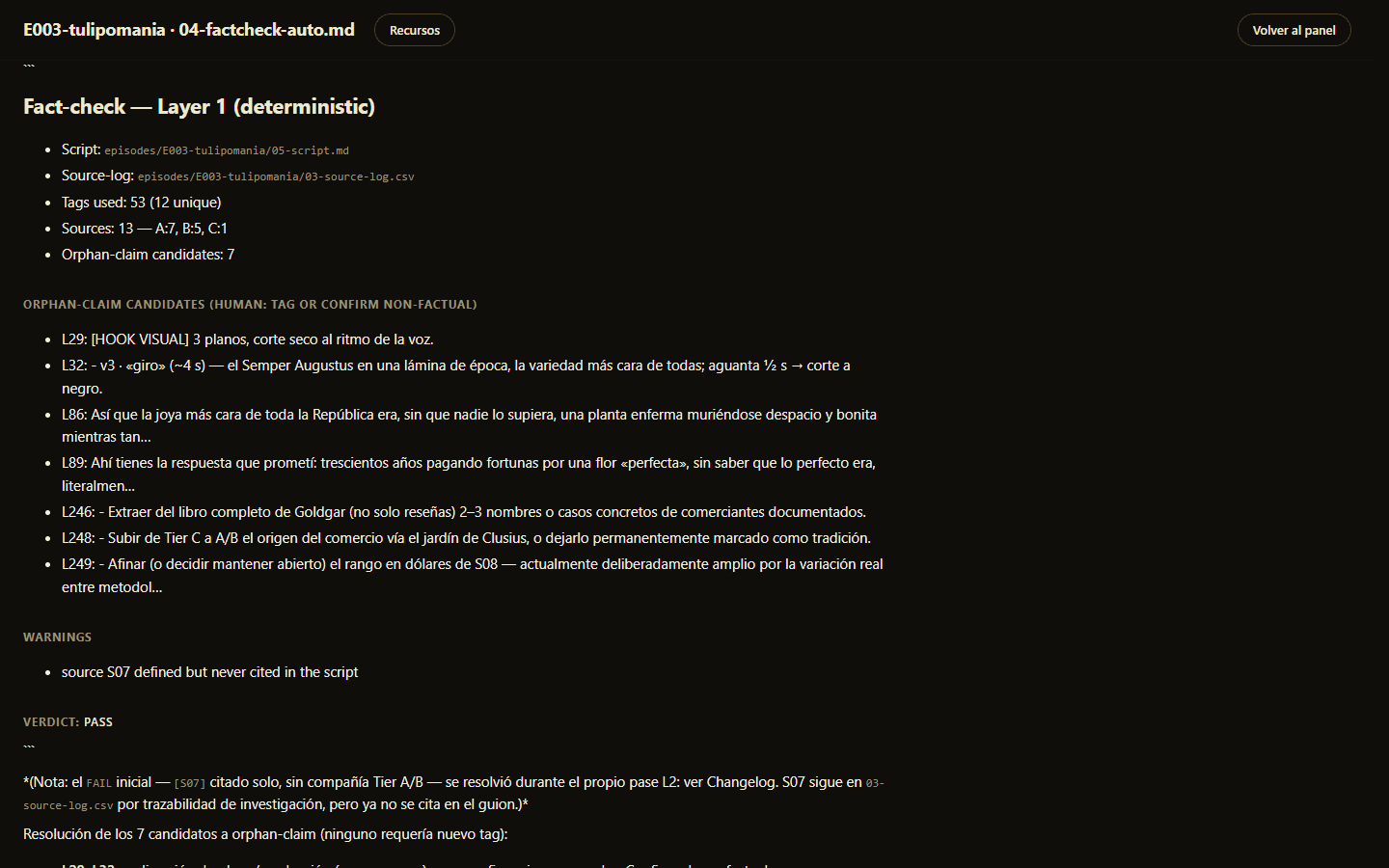
Layer one is deterministic. Every citation tag must resolve to a row in the source log, every source needs a tier and a rights status, sentences that contain a number, date, name or quote without a tag are flagged, and claims backed only by weak sources are called out. Layer two is an AI edit pass that may only tighten, hedge, attribute or cut, never add a fact, and it writes a changelog. Legal and ethical items are deferred to a single human tick at publication, and the accepted residual risk is documented.
Stage 6 · Shotlist
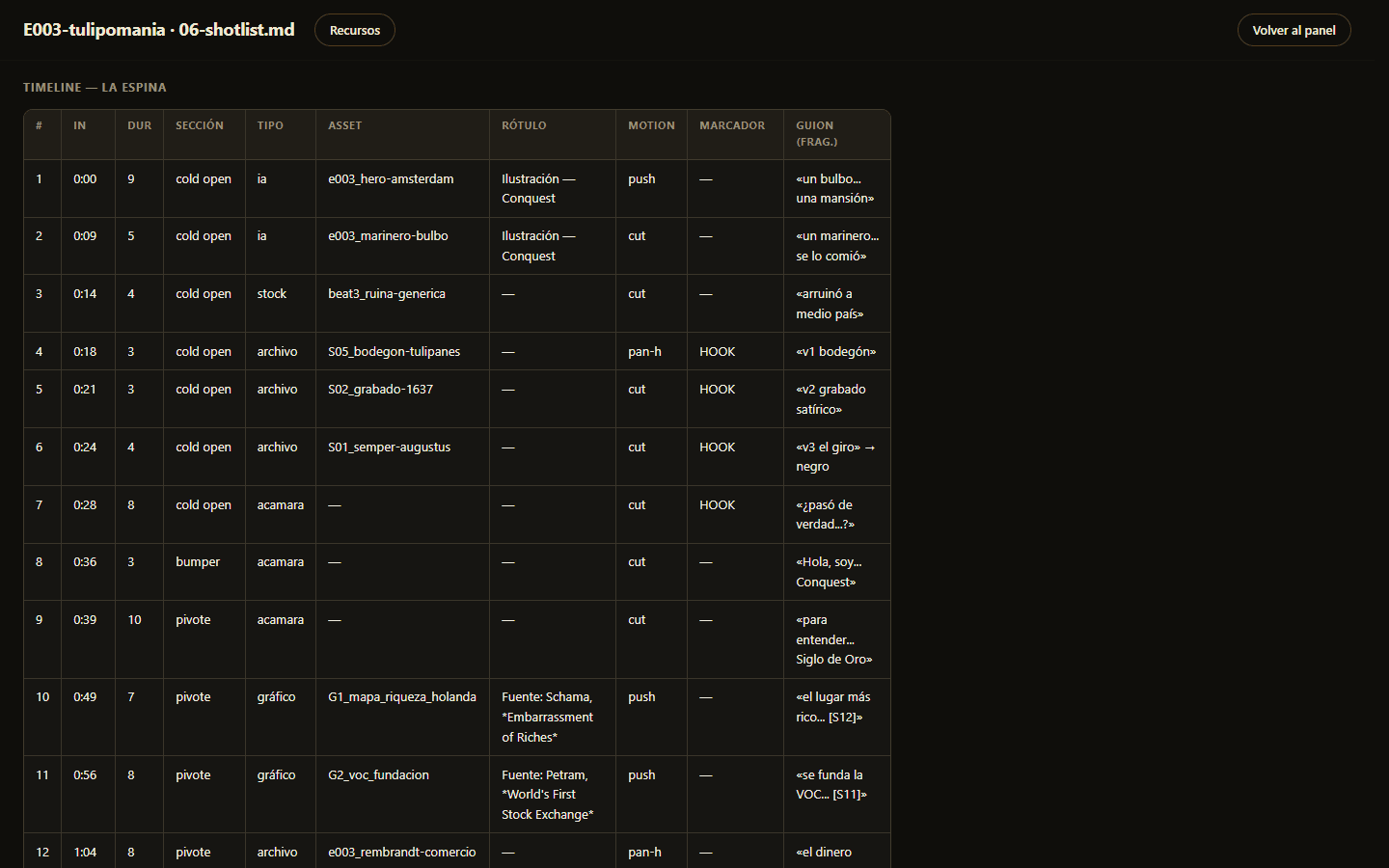
Every beat of the script becomes a row on a timeline, classified by type (AI image, stock, archive, on camera or graphic), with its asset id, label, motion and the script fragment it covers. This is the spine that every later stage hangs on.
Stage 7 · Assets, rights and AI labels
A tab-separated file holds one row per shotlist beat. The tool queries stock, archive and museum APIs and builds a picker with the candidates on one side and the AI prompts on the other. No beat may be left without a row, and once I choose, the tool verifies resolution and appends credits. Anything not freely licensed goes into a rights table that tracks the running share of unlicensed images against a ceiling. Music is limited to open licences, and the soundtrack is only the narrator's voice plus a licensed bed.
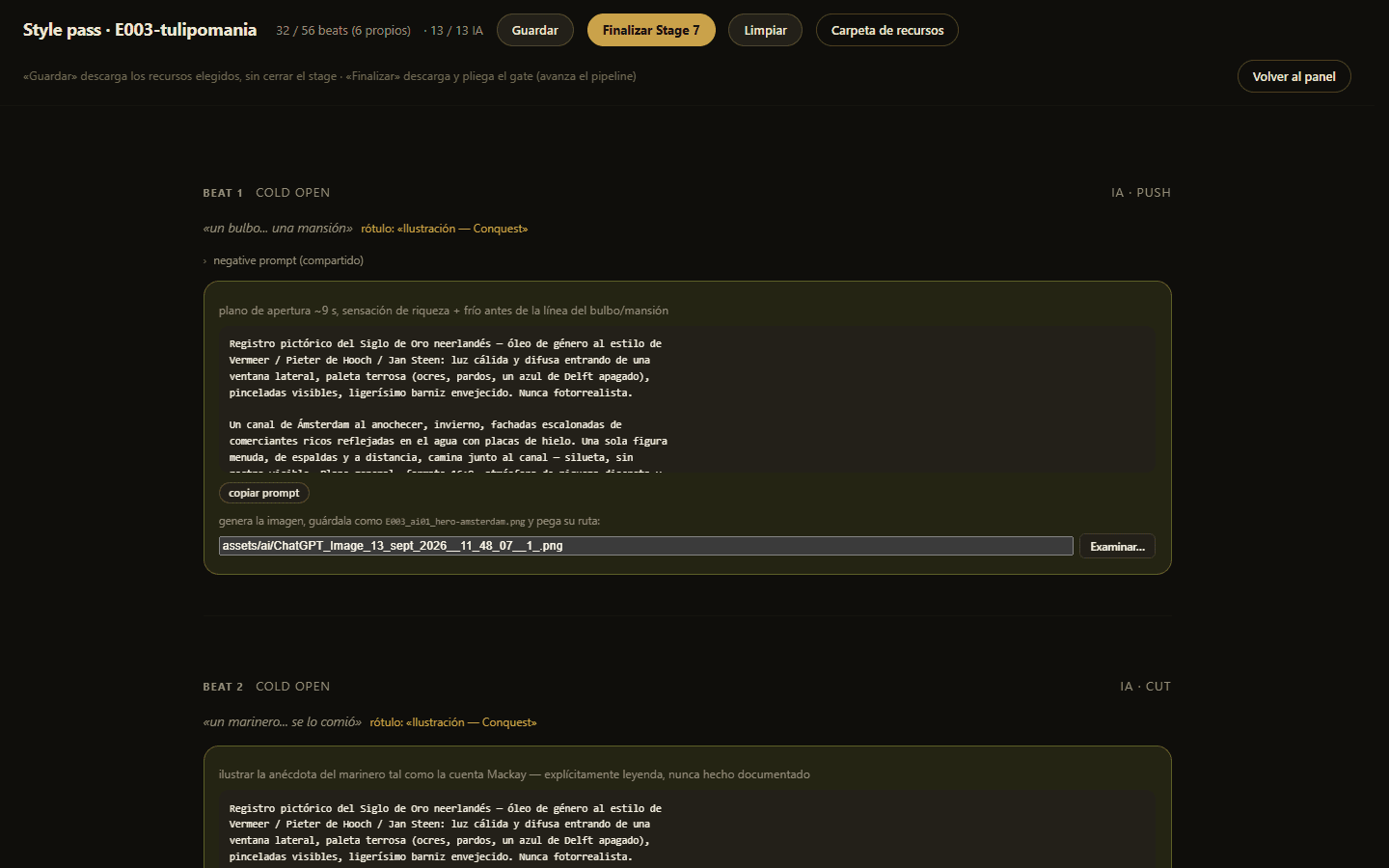
AI images are a first-class visual register under one rule set: a single style per episode, a permanent on-screen label burned in at the edit, and never presented as archival. The prompt scaffold, the label and the final audit all live in the pipeline, so the rule is enforced by tooling rather than memory.
Stage 9 · The trim room and the edit room
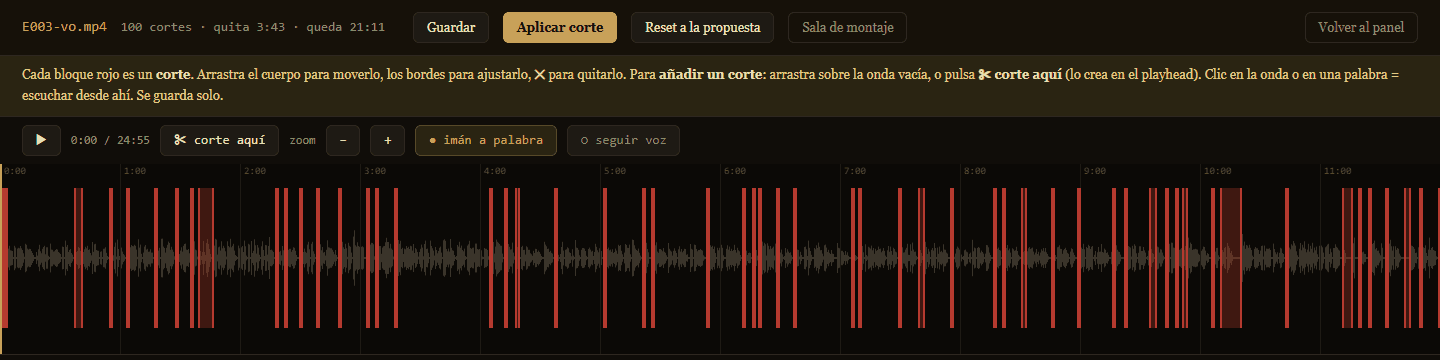
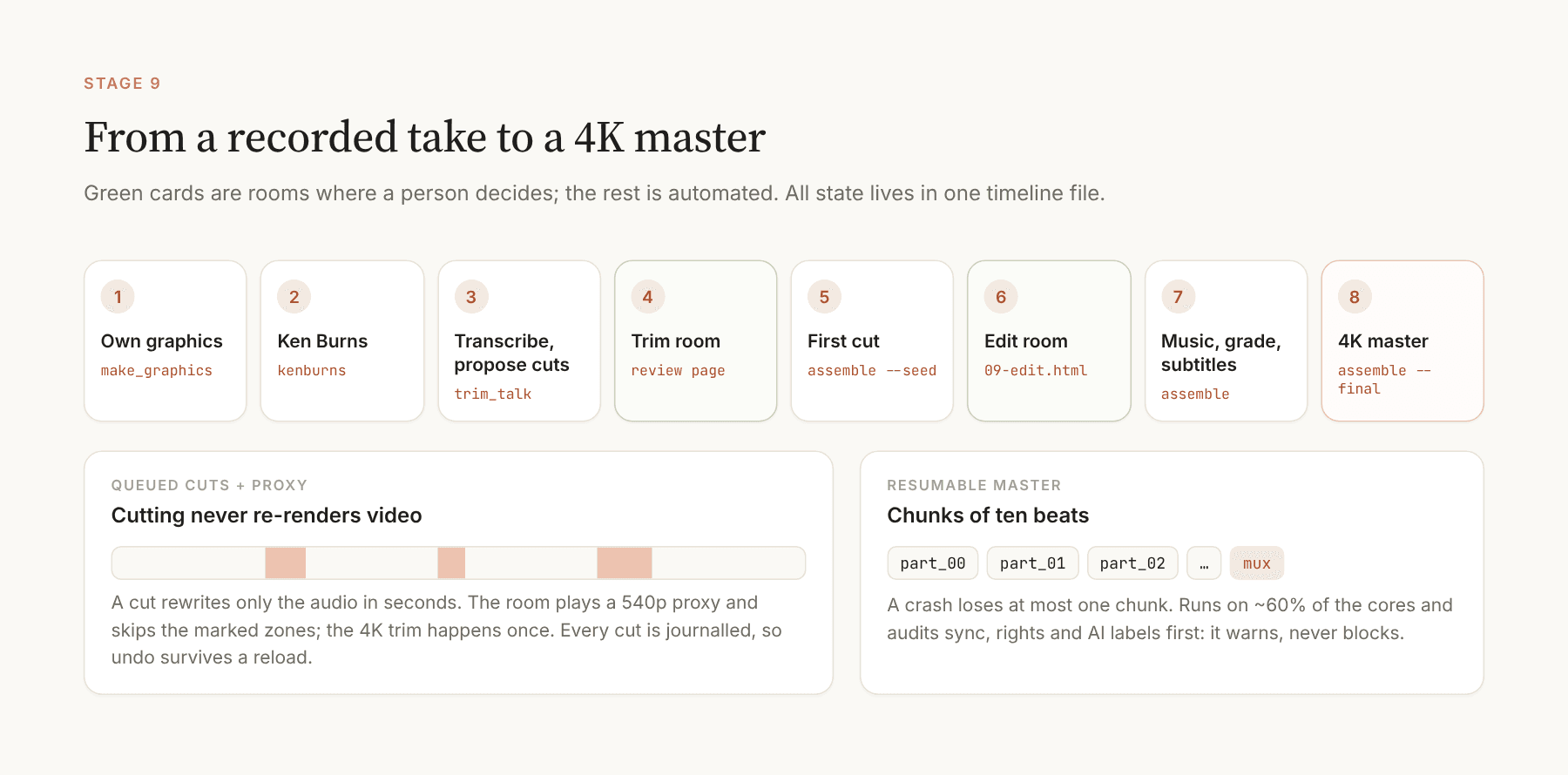
Word timestamps from faster-whisper drive proposed cuts (silences, standalone fillers and re-said takes), shown on a waveform as draggable red blocks. Cuts are queued, not rendered: a soft cut rewrites only the audio in seconds, and the heavy 4K trim happens once at the end. While cuts are pending the room plays a small proxy and skips the cut zones, so picture and voice stay in sync. Every cut is journalled, and Ctrl+Z and Ctrl+Shift+Z undo and redo exactly, even after a reload.
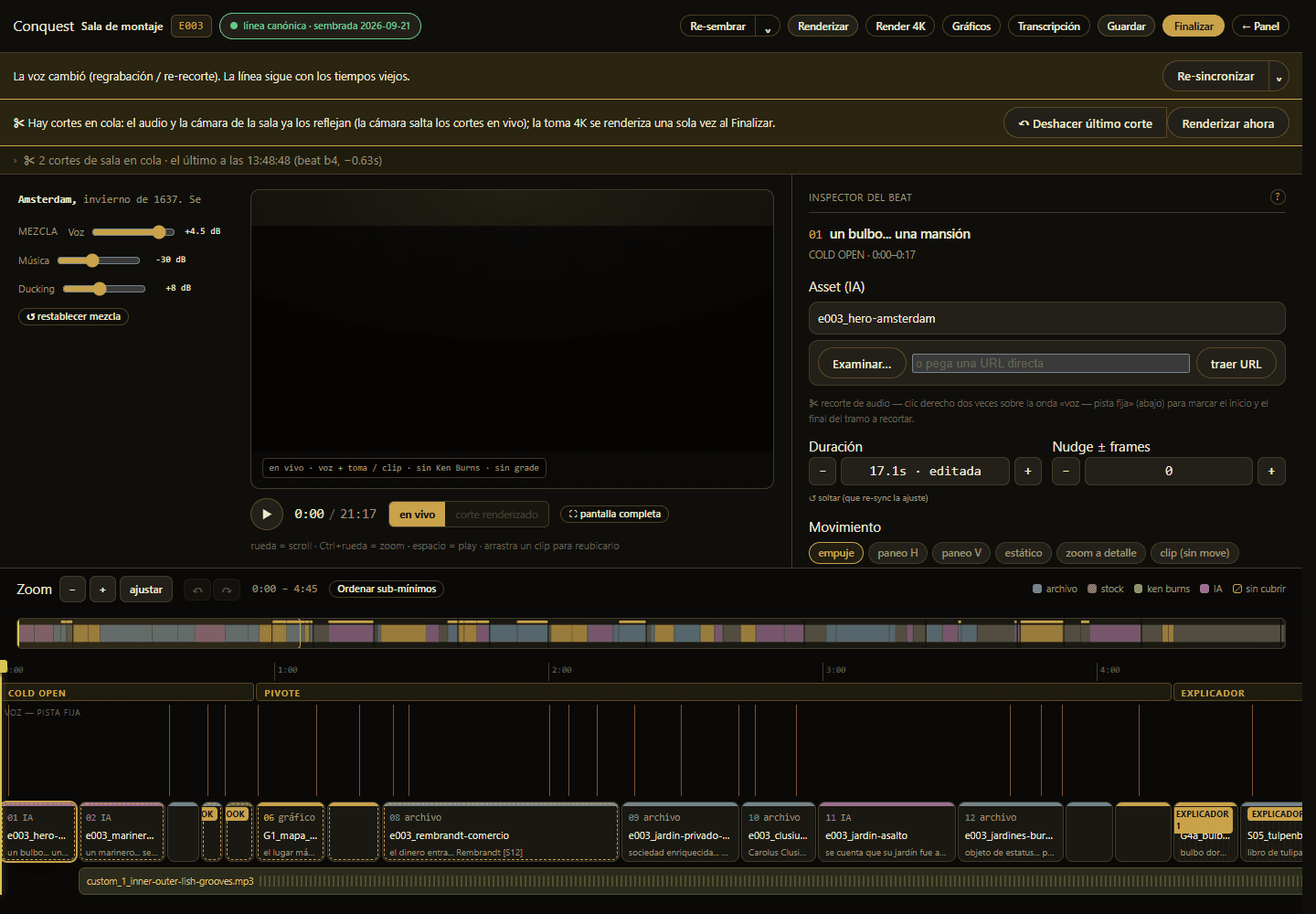
The edit room adds a block for each beat and an inspector to swap assets, change durations with ripple and set Ken Burns motion. It offers structure operations (add, split, merge, duplicate, delete and reorder) and a mix strip with voice gain, music level and ducking, and it autosaves.
Voice re-sync and the resumable 4K master
A global fuzzy matcher aligns each beat's script line to the recorded words, but only when asked. An independent sync report then checks whether each line is actually spoken inside its window and warns below 60%. After a re-trim or a re-record the room shows a banner and never re-aligns silently, and a pickup room lets me re-record a single line in the browser, loudness-matched to the original.
The master renders in chunks of ten beats, each encoded once and kept, so a crash, a sleep or a cancel loses at most one chunk. It runs at below-normal priority on about 60% of the cores, keeps the PC awake and refuses a second render of the same episode. Before every final render an audit reports out-of-order beats, low sync, an opening mismatch, assets whose rights are still pending and AI images without a label. It warns and never blocks.
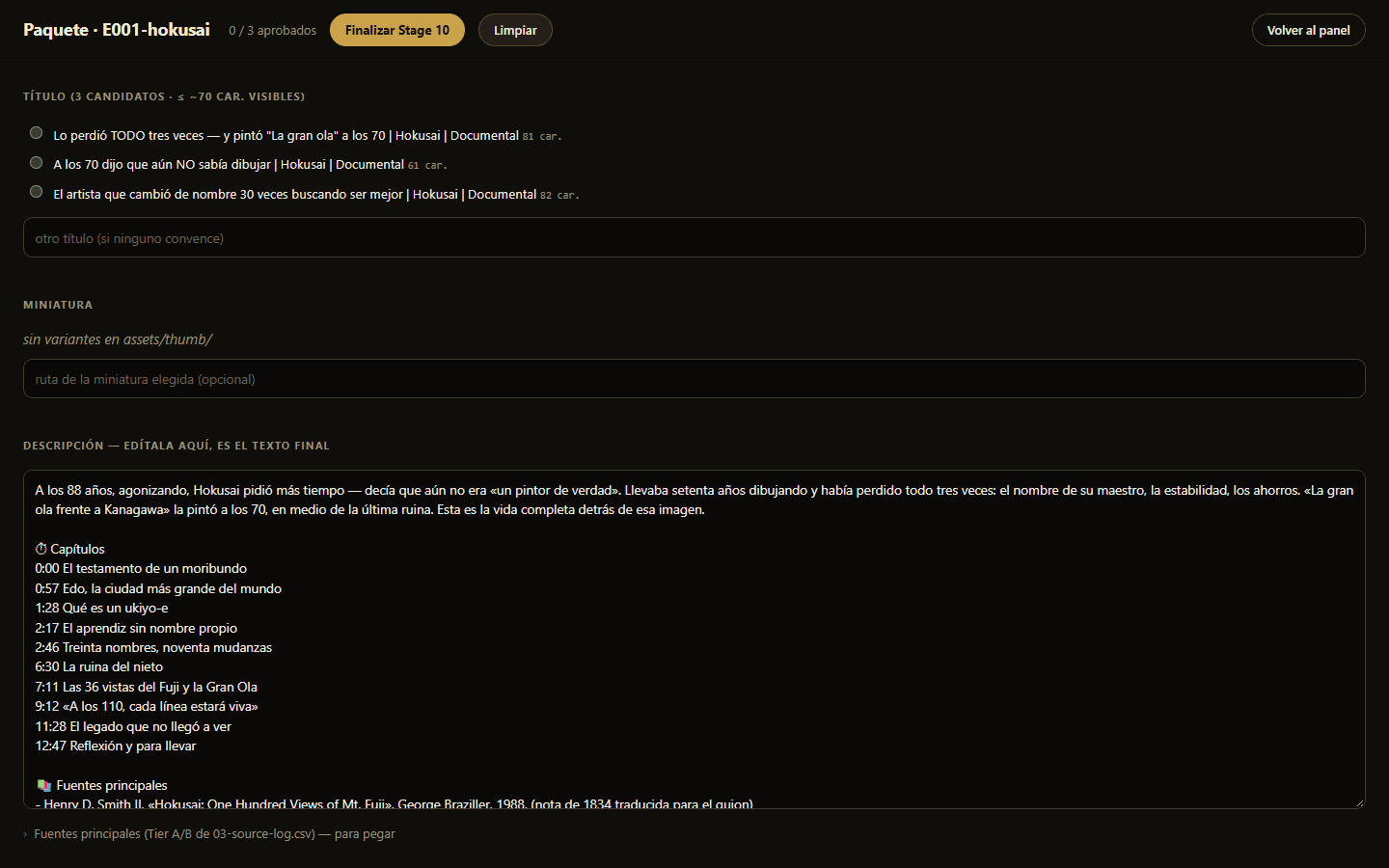
Stage 10 · Package
Three title candidates with character counts, the thumbnail slot and an editable description with chapters. The gate requires that the title is honest and that three people approve.
Stages 3, 8, 11 and 12
The outline is drafted by an agent, the recording and the publication are offline steps with a checklist (including the legal tick), and the retrospective closes the loop with the numbers at 48 hours and 30 days.
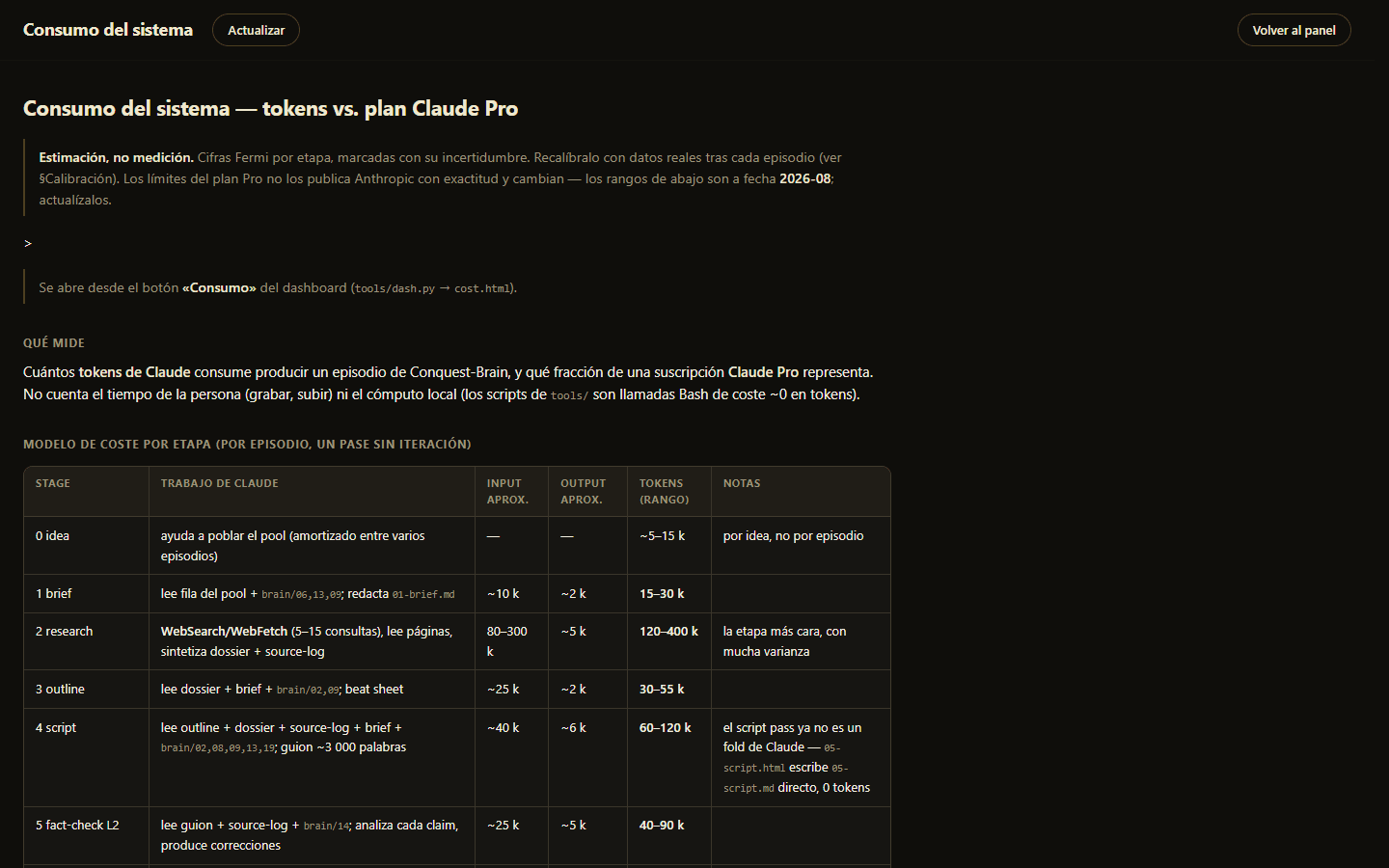
Keeping an eye on the cost
A cost page estimates the LLM usage of each stage against a plan. The tool that refreshes it does not invent numbers.
6. Under the Hood
Gate engine
The engine applies a stage's exported decisions and signs its gate. Moving on requires a signed gate, resets it, queues the next agent stage and removes the stale one, so an old task can never run twice. A drain mode processes every episode up to its own auto-advance ceiling. It even works without the server: the finish button downloads a file and the command line folds it in.
A design system in one file
The whole visual language (a warm dark base with a gold accent, serif chapter cards and a typewriter case-file device) lives in a single theme module, so agents never load styled markup, and a house colour grade is generated from a handful of constants.
7. Decision Records
Plain files instead of a database
Diffable, readable by people and agents and versioned with the code. The price is hand-rolled parsers and a few Spanish column names.
Fold kinds keep tokens for judgement
Each gate declares how it is closed: mechanically in Python, by verifying an artifact exists, by queuing an agent, or by a person marking it done. Only the agent stages ever consume tokens, and an idle agent tick is a single small file read.
Design quarantined in a theme module
Gate folds and queue drains never load styled HTML, which keeps agent context small.
The timeline is authored, not derived
The script and the transcript seed the timeline once, and my edits survive rebuilds. The trade-off is that a re-record needs an explicit re-sync.
Queue the heavy work
Cheap soft cuts and a proxy make editing instant, and the expensive render runs once.
Automated fact-check with documented risk
Tagging every claim to a graded source, a mechanical first layer and a legal tick at publication reduce the risk, and the docs state plainly what remains.
Local only
Everything binds to localhost with no authentication, and the render is tuned to be gentle on a laptop.
8. A Worked Example
Numbers from real artifacts of the episodes in production show what the gates actually check.
Fact-check: One script carried 53 citation tags pointing to 12 distinct sources, 13 rows in the source log split as 7 top-tier, 5 second-tier and 1 third-tier, and passed layer one.
Trim: On one take, the trim room proposed 100 cuts that removed 3 minutes 43 seconds and kept 21 minutes 11 seconds, all as reviewable red blocks.
Rights: For one episode the running share of unlicensed images was around 2.5%, against a ceiling of about 30%.
Several episodes at once: The dashboard tracks four episodes at different stages, from one at publication to one still at shotlist with an agent task queued.
9. Outcome
34
Python tools
16k
lines of code
13
gated stages
23
rule documents
166
commits in 4 weeks
Key Takeaways
- Gates make quality repeatable: Every hard decision has an owner and a record, so the process no longer depends on remembering it.
- Spend intelligence only where it matters: Routing mechanical work to Python kept the AI for judgement and kept the running cost close to zero.
- Warnings beat walls: Audits that explain a problem were used, while blocking ones would have been bypassed.
- Documentation is part of the product: Routing docs by frontmatter let an agent read a few files instead of the whole knowledge base.
Next steps: A three-way merge so a re-recorded take can be re-synced without redoing the edit, which the docs already list as planned.