MOODS
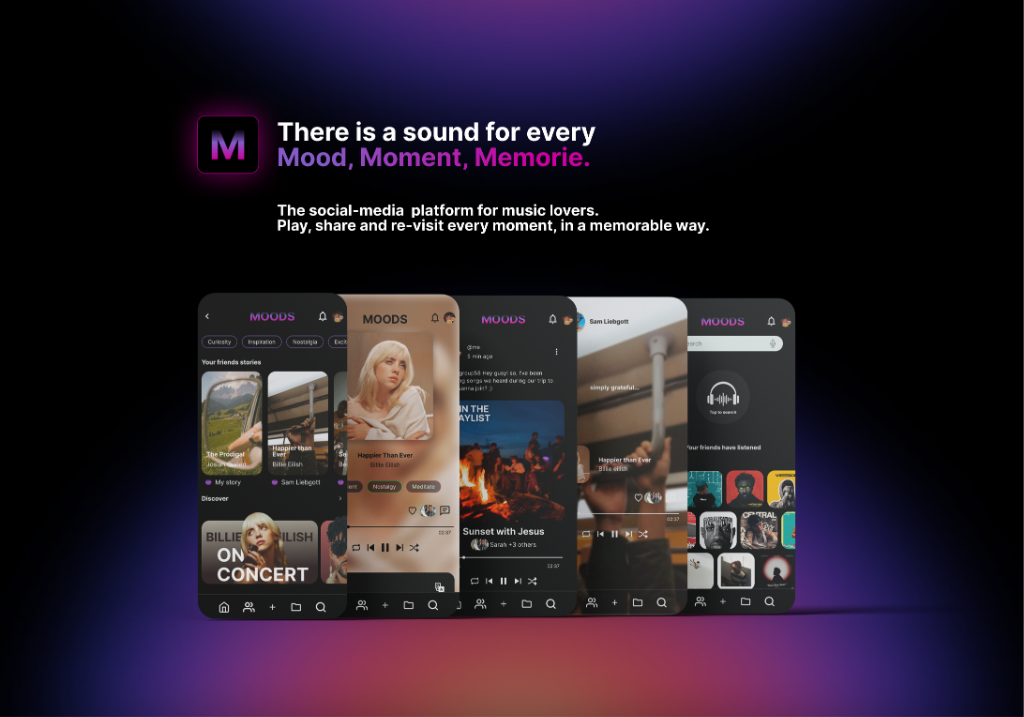
Sounding memories. There's a sound for every moment, memory, and mood. With MOODS, the social-media platform for music lovers, you can listen, share, and re-live the sound of every meaningful memory in a memorable way.
My Role
Concept & Design
Duration
5 Weeks
Tools
Figma + Material 3
Type
App Redesign
Project Overview
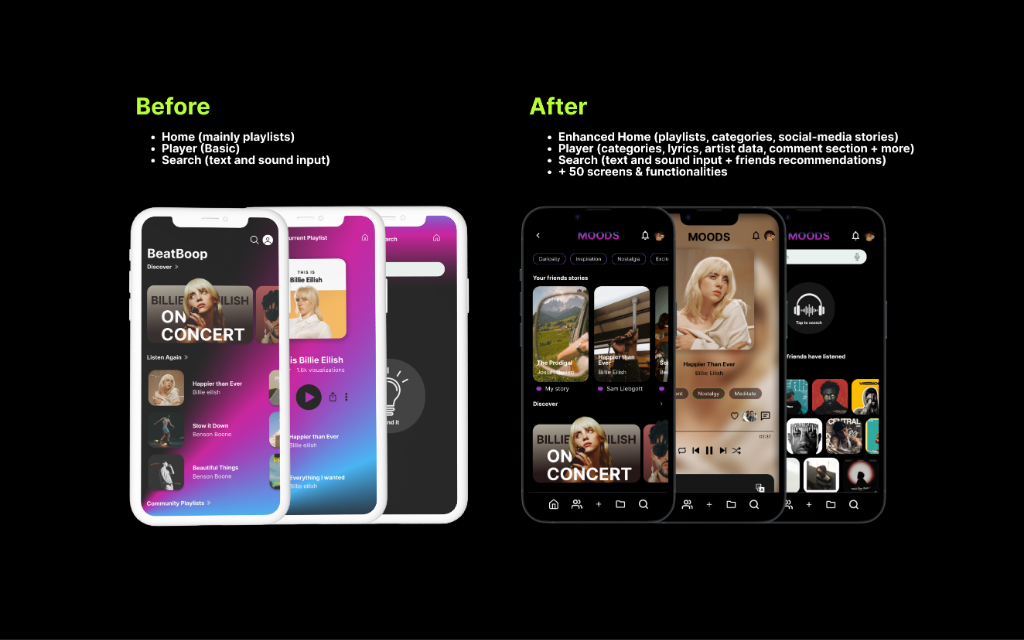
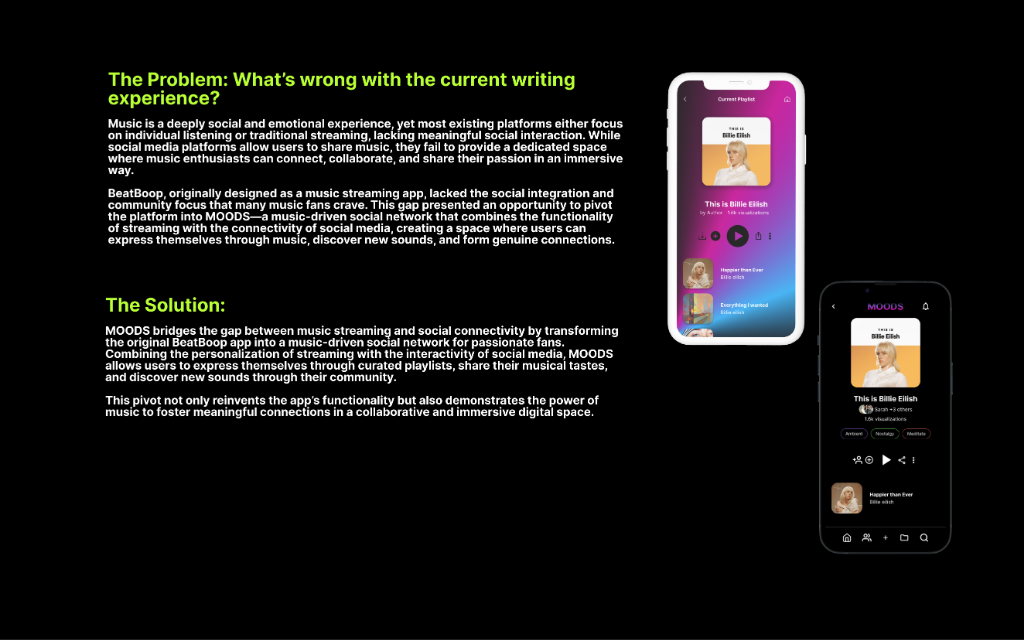
From streaming app to social network. What started as BeatBoop, a music streaming app created as an educational project, has now evolved into MOODS—a vibrant social platform for music lovers.
This reimagined platform builds upon its predecessor's foundation, refining features and functionalities to deliver a fresh, engaging experience. MOODS not only celebrates music as a shared passion but also emulates a real-world app pivot scenario—showcasing the journey of transforming an existing concept into an innovative product.
My Process
1. Define
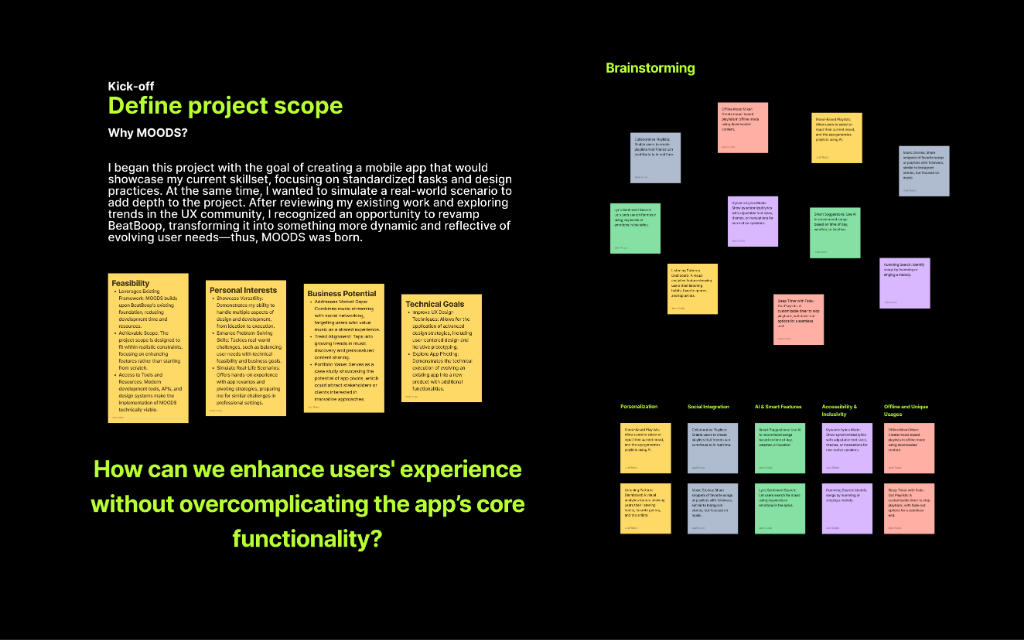
During this stage, I conducted a UX audit of the existing BeatBoop app, identifying key opportunities for improvement. I then defined the scope of the revamp, ensuring a strategic overhaul of its functionalities, user experience, and brand identity.
This process laid the foundation for a well-structured rebuild, aligning MOODS with user needs and industry trends while answering a critical question: How can we enhance users' experience without overcomplicating the app's core functionality?
Finding a Direction to Develop
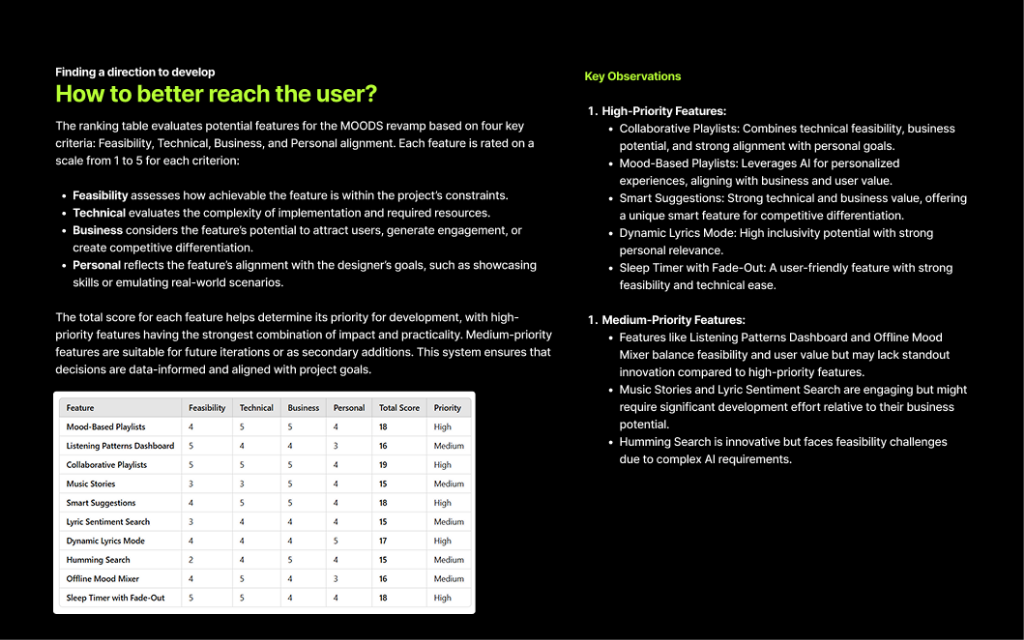
To prioritize features effectively, I created a ranking framework evaluating potential features across four key criteria: Feasibility, Technical complexity, Business potential, and Personal alignment.
This data-driven approach revealed high-priority features like Collaborative Playlists, Mood-Based Playlists, and Smart Suggestions—features that combined technical feasibility with strong business and user value.
Why Social?
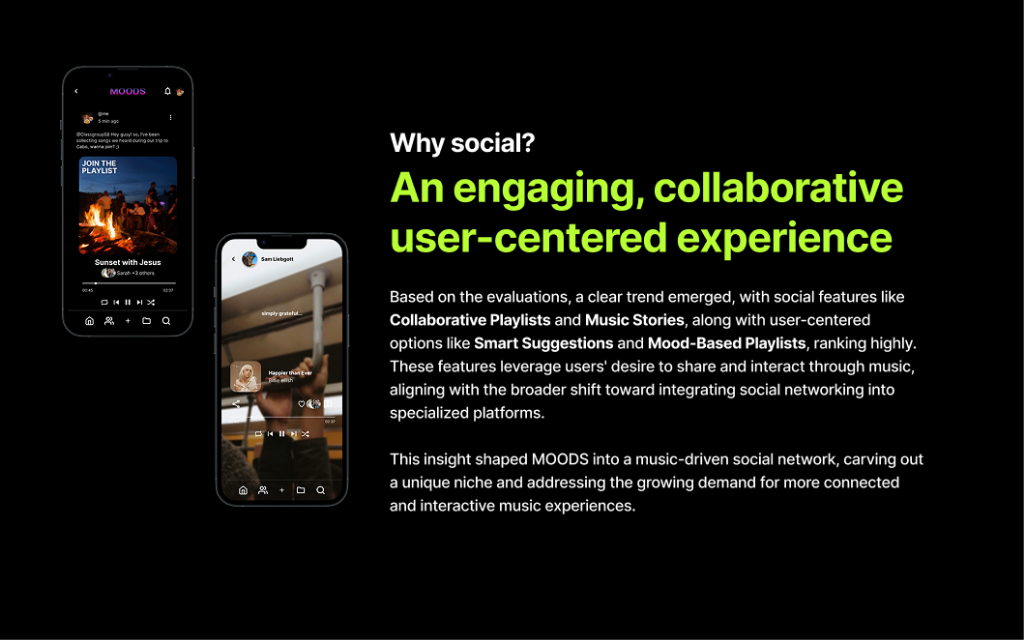
Based on the evaluations, a clear trend emerged: social features ranked highest. Features like Collaborative Playlists and Music Stories, combined with user-centered options like Smart Suggestions and Mood-Based Playlists, showed the strongest potential.
These features leverage users' desire to share and interact through music, aligning with the broader shift toward integrating social networking into specialized platforms. This insight shaped MOODS into a music-driven social network, carving out a unique niche and addressing the growing demand for more connected and interactive music experiences.
2. The Research
To explore user behavior and preferences regarding social interactions in music-driven apps—or music-focused interactions within social media platforms—while validating the effectiveness of MOODS' key features in fostering engagement and community among music enthusiasts.
🎯 Research Goals
- Analyze User Interaction Trends: Review how users engage with social features in existing music-driven apps to inform MOODS' design.
- Identify Motivations for Social Engagement: Investigate user motivations behind music-based social interactions to guide MOODS' feature development.
- Assess Social Features' Impact on Retention: Study the effect of social elements on user retention in similar platforms to predict MOODS' potential impact.
Competitive Audit
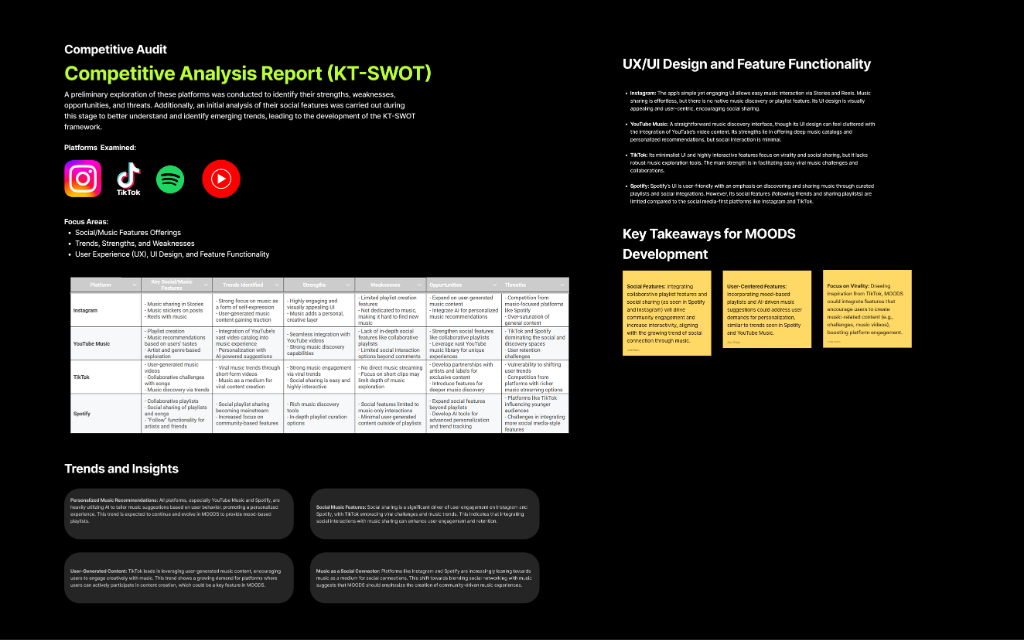
I conducted a comprehensive competitive analysis examining platforms like Instagram, TikTok, Spotify, and YouTube Music. Using a KT-SWOT framework, I identified their strengths, weaknesses, opportunities, and threats—focusing specifically on social/music features, UX/UI design, and feature functionality.
Key insight: While platforms like Spotify offer collaborative playlists and Instagram excels at visual storytelling, none provide a fully immersive social network experience centered on music. This gap validated MOODS' unique positioning.
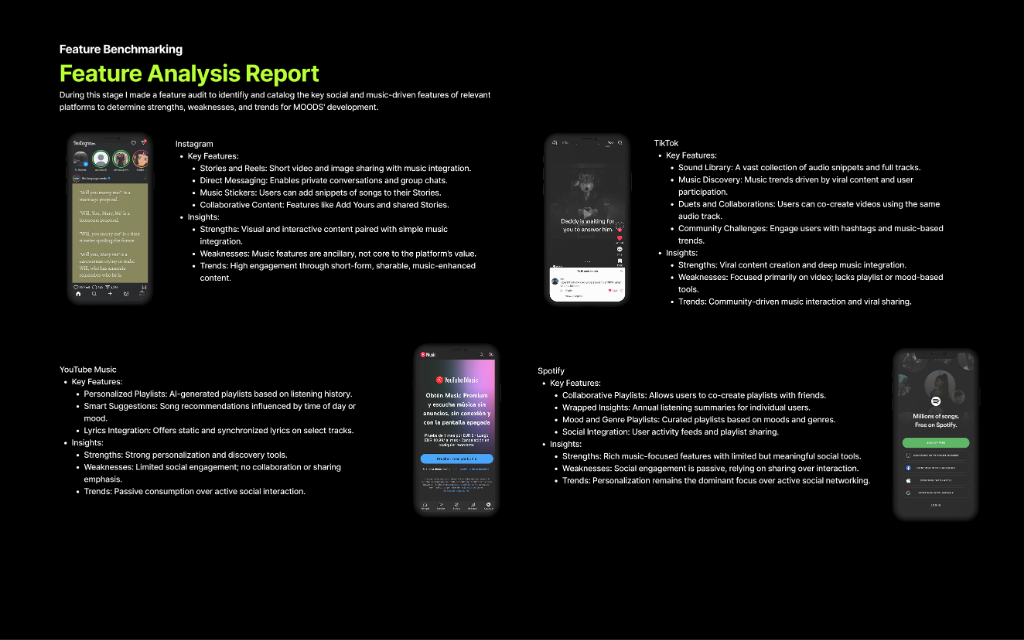
Feature Benchmarking
I created a feature audit to identify and catalog the key social and music-driven features of relevant platforms. This analysis revealed strengths, weaknesses, and trends that would directly inform MOODS' development.
Platforms like TikTok excel at viral content creation and music integration, while Spotify focuses on personalization but lacks meaningful social tools. This benchmarking helped identify opportunities for MOODS to differentiate through collaborative features and community-driven discovery.
Personas Development
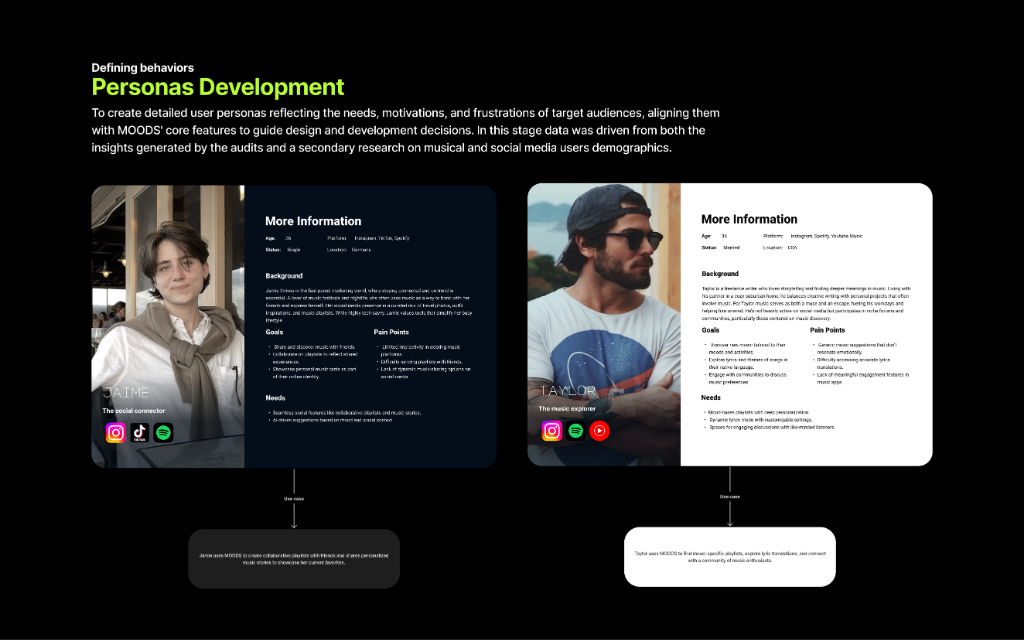
To create detailed user personas reflecting the needs, motivations, and frustrations of target audiences, I developed two primary personas: Jamie (The Social Connector) and Taylor (The Music Explorer).
Data was driven from both the competitive audits and secondary research on musical and social media user demographics. These personas guided design and development decisions, ensuring MOODS' core features aligned with real user behaviors and pain points.
Synthesized User Needs
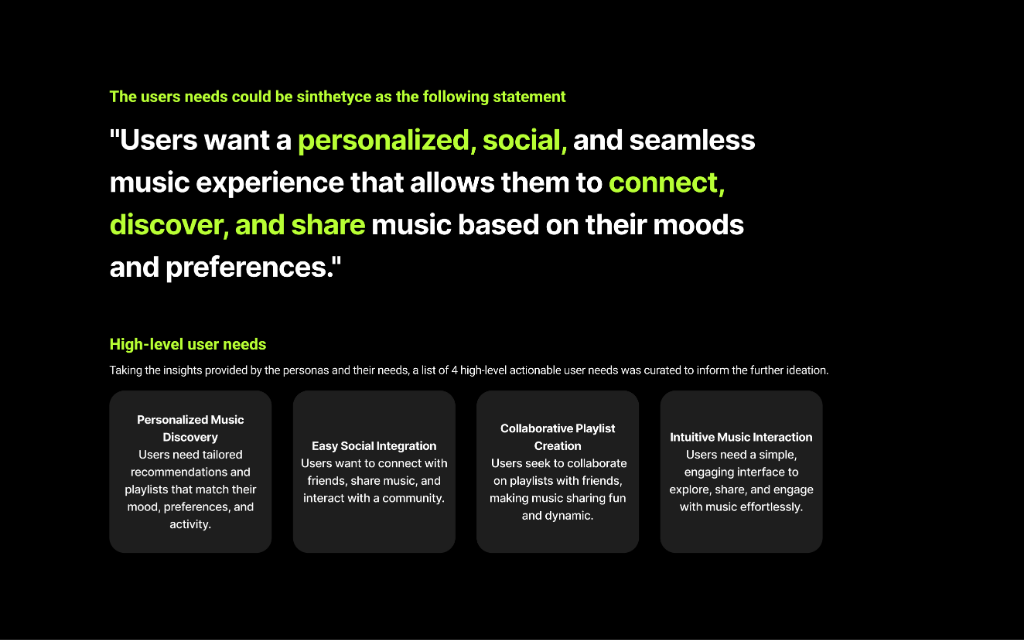
From the personas and their needs, I synthesized a core user needs statement that would drive all feature development:
"Users want a personalized, social, and seamless music experience that allows them to connect, discover, and share music based on their moods and preferences."
3. The Ideation
During this stage, I analyzed and refined the research insights to define and validate the core functionalities of the revamp. I identified gaps and opportunities for differentiation, crafted a cohesive narrative, prioritized features using a structured matrix, and mapped out user journeys to ensure a seamless and engaging experience for each feature.
Need-to-Feature Report
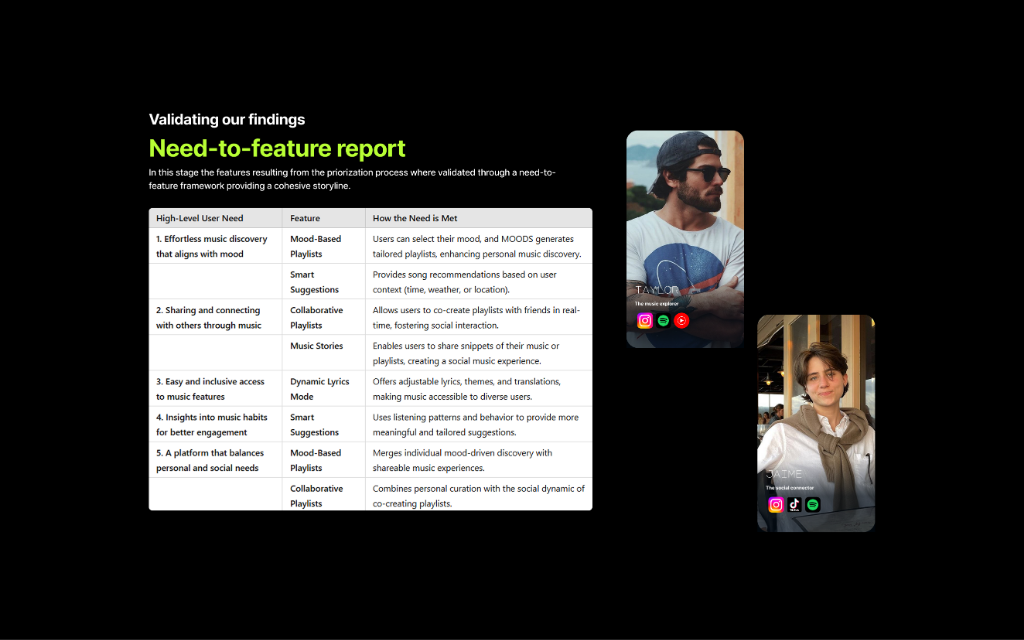
Using the synthesized user needs, I created a need-to-feature framework that directly mapped each high-level user need to specific features. This ensured every feature had a clear purpose and addressed real user pain points.
For example, the need for "Sharing and connecting with others through music" translated into features like Collaborative Playlists and Music Stories—allowing users to co-create playlists with friends and share musical moments in a social feed.
This systematic approach validated that MOODS wasn't just adding features for the sake of it—each one served a strategic purpose in creating a cohesive, music-driven social experience.
Gaps and Opportunities, Feature Matrix Framework, Feature Prioritization
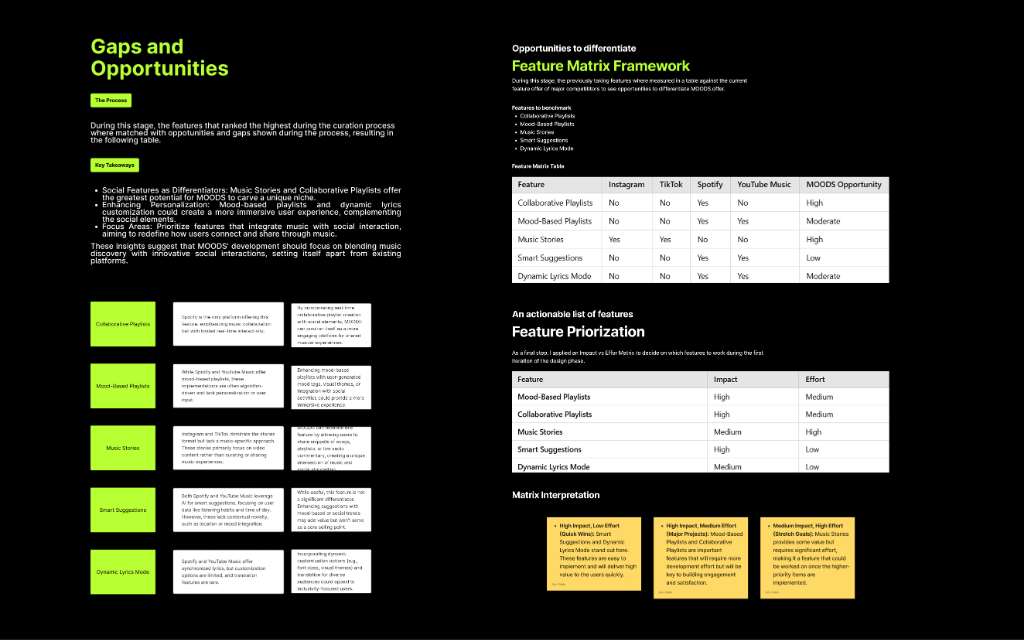
During this stage, the features that ranked the highest during the curation process were matched with opportunities and gaps known during the process, resulting in a comprehensive analysis:
Key Differentiators: Social features like Music Stories and Collaborative Playlists offer the greatest potential for MOODS to carve out a unique niche. These features enable expressive storytelling and dynamic, immersive interactions—capabilities that existing platforms lack.
Additionally, I created a Feature Matrix Framework comparing MOODS against Instagram, TikTok, Spotify, and YouTube Music. This revealed that while some platforms offer collaborative playlists or music stories individually, none combine them with mood-based discovery and smart suggestions in a unified social experience.
Feature Prioritization
Using an Impact vs. Effort matrix, I prioritized features based on their potential to drive engagement while considering implementation complexity:
- High Impact, Low Effort: Mood-Based Playlists and Smart Suggestions—features that leverage AI to enhance personalization without overwhelming development resources.
- High Impact, Medium Effort: Music Stories and Collaborative Playlists—social features that require more development but offer significant differentiation.
- Medium Impact, High Effort: Dynamic Lyrics Mode—an innovative feature with strong personal relevance but higher technical complexity.
This structured approach ensured decisions were data-informed and aligned with project goals, balancing innovation with feasibility.
User Journey Workflows
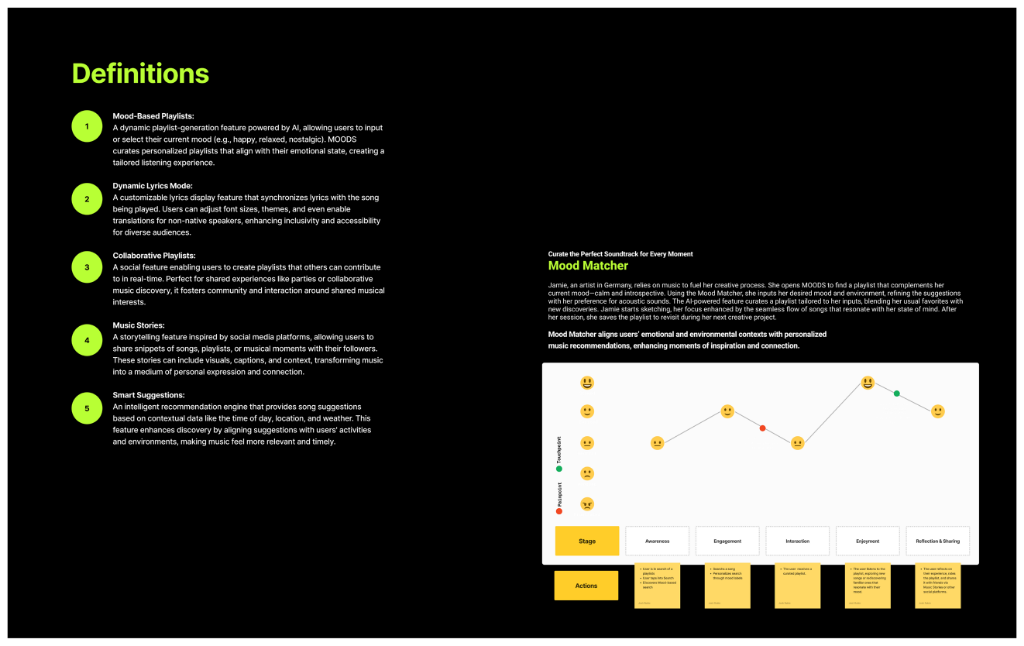
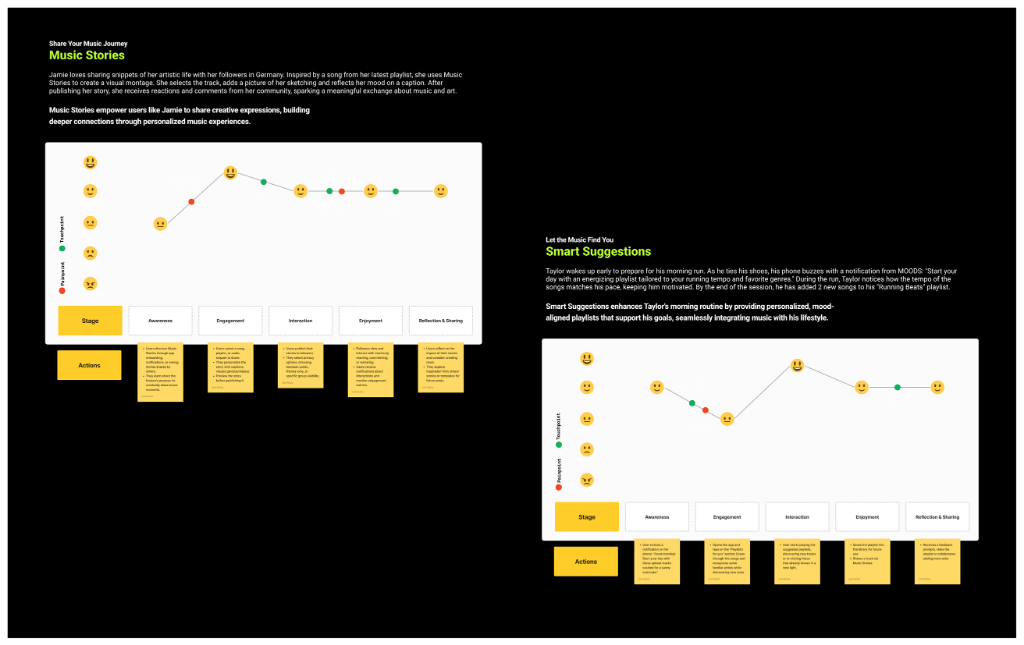
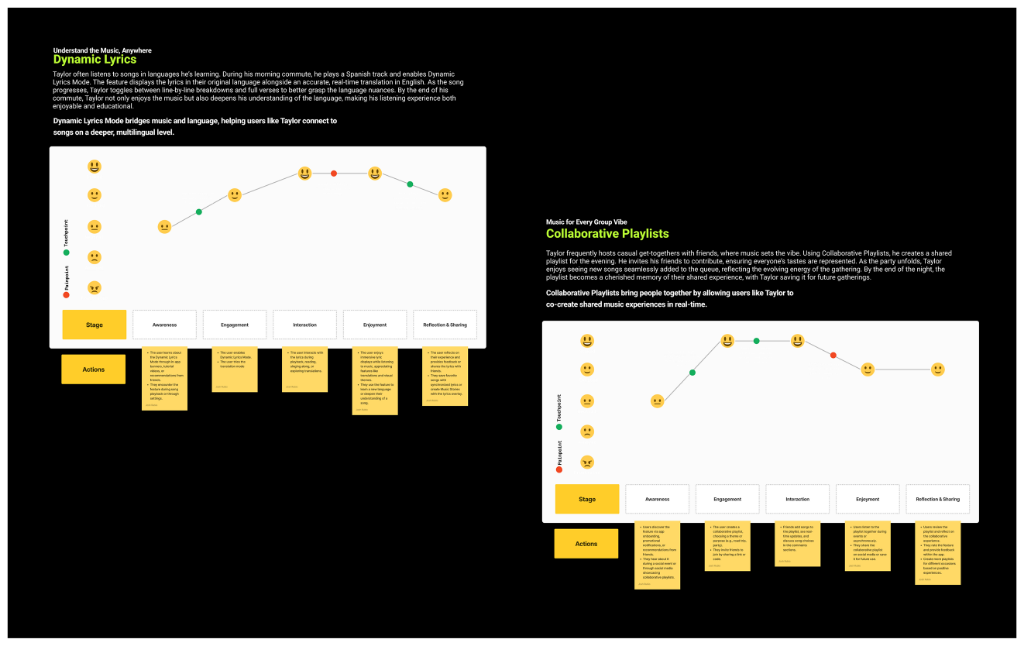
For each high-priority feature, I mapped detailed user journey workflows tracking emotional states, actions, and pain points across six stages: Stage → Awareness → Engagement → Interaction → Enjoyment → Reflection & Sharing.
Definitions & Mood Matcher
Let the Music Find You. Taylor wakes up early to prepare for his morning run. As he ties his shoes, his phone buzzes with a notification from MOODS: "Start your day with energy!" He taps it and finds the "Running Beats" playlist. Later, Jamie uses the Mood Matcher to find a playlist that complements her current mood—calm and introspective—offering her suggestions that align with her emotional state.
Smart Suggestions enhance Taylor's morning routine by providing personalized, mood-aligned playlists that support his goals, seamlessly integrating music with his lifestyle.
Music Stories & Smart Suggestions
Share Your Music Journey. Jamie loves sharing snippets of her artistic life with her followers in Germany. Inspired by a song from her latest playlist, she uses Music Stories to create a visual story paired with music—establishing her vibe, receiving reactions and comments from her community, sparking a meaningful exchange about music and art.
Dynamic Lyrics Mode & Collaborative Playlists
Understand the Music, Anywhere. Taylor often listens to songs in languages he's learning. During his morning commute, he plays a Spanish track and enables Dynamic Lyrics Mode—which synchronizes lyrics with the song being played. Users can adjust font sizes, themes, and even enable translations, making music accessible to diverse audiences.
Dynamic Lyrics Mode bridges music and language, helping users like Taylor connect to songs on a deeper, multilingual level.
Music for Every Great Vibe. Taylor frequently hosts casual get-togethers with friends. Using Collaborative Playlists, he creates a shared playlist for the evening. His friends can search, vote on songs, and add their own favorites—creating a dynamic, crowd-sourced soundtrack. The playlist evolves in real-time, reflecting the group's collective taste and energy.
Collaborative Playlists bring people together by allowing users like Taylor to co-create shared music experiences in real time.
4. The Design
With research and ideation complete, I transitioned into the design phase—where insights transformed into tangible, polished interfaces. This stage focused on building a cohesive visual language, refining user flows, and ensuring every interaction felt intuitive and engaging.
The design process balanced familiarity with innovation—revamping existing features while seamlessly integrating new social functionalities. The goal was to create an experience that felt both fresh and familiar, allowing users to explore MOODS' new capabilities without friction.
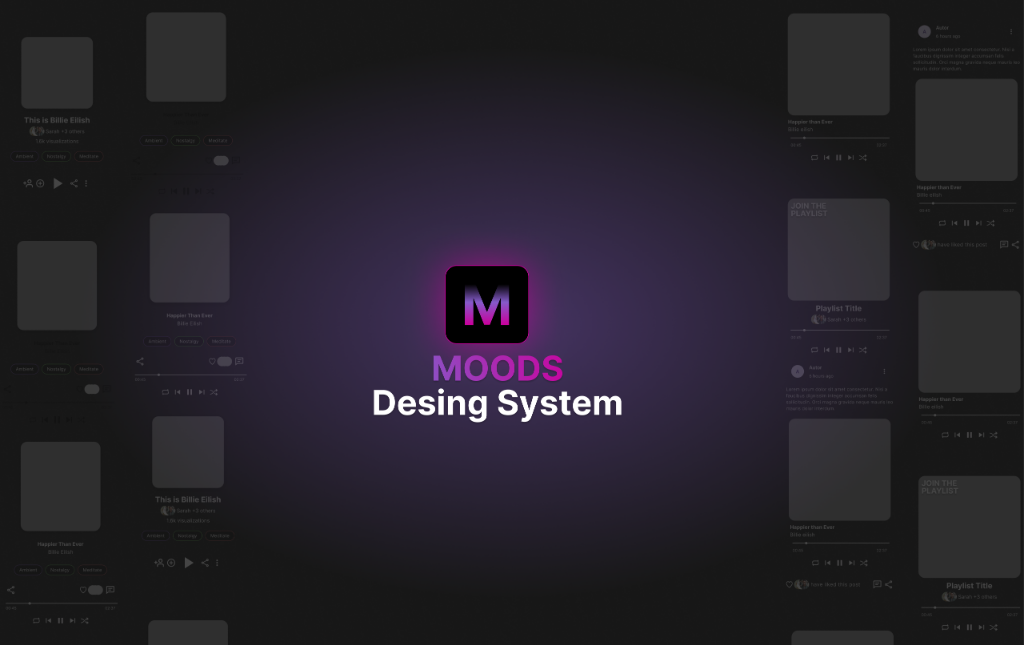
Design System
For MOODS, a design system was developed using Google Material 3 as a foundation. This system was then refined and expanded to accommodate the unique requirements of a music-centric and socially interactive platform.
Custom components, typography, and visual elements were carefully curated to enhance usability, maintain brand consistency, and ensure a seamless user experience across all interactions. The system provided a scalable framework that supported rapid iteration while maintaining visual coherence.
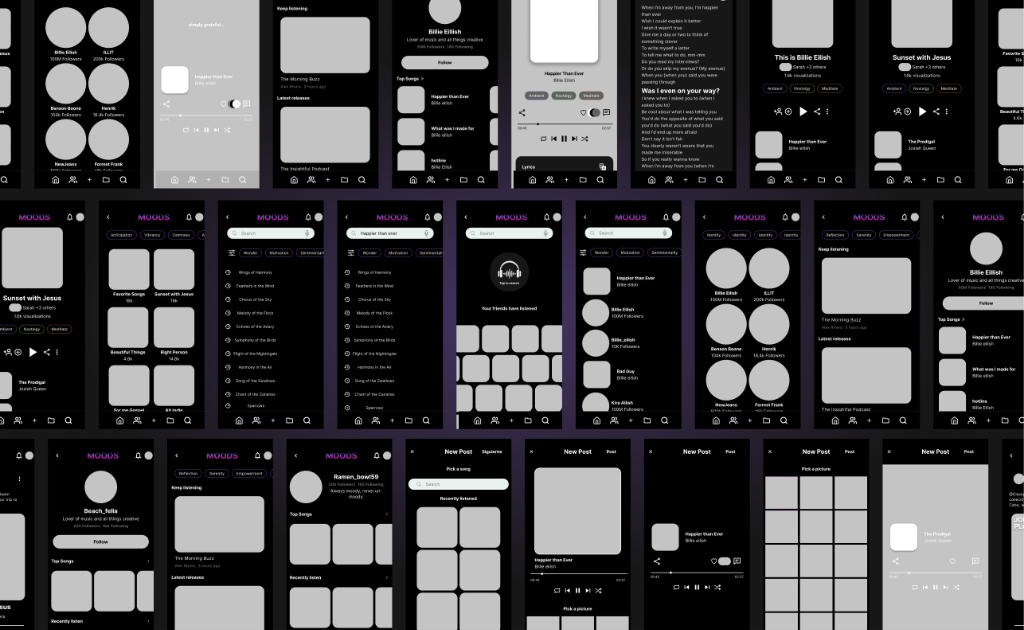
Wireframes
During the wireframing phase, I focused on structuring the revamped MOODS experience with clarity and usability at its core. I started with low-fidelity wireframes to explore multiple layout possibilities, ensuring that core functionalities were intuitive and accessible.
Iterating based on research insights, I refined the wireframes, mapping out user interactions and optimizing information hierarchy. The goal was to create a solid foundation for the visual design while maintaining flexibility for future refinements.
Features
During the design stage, I focused on revamping each of the pre-existing features—such as Home, Player, Lists, and Profiles—by scaling them to align with the MOODS concept. This involved refining the UI, improving usability, and ensuring consistency with the newly developed design system.
Additionally, I integrated the new social-media features, making them feel like a seamless extension of the platform rather than an afterthought. This feature-driven approach allowed me to maintain a user-centered perspective, ensuring that every screen and interaction supported the overall experience.
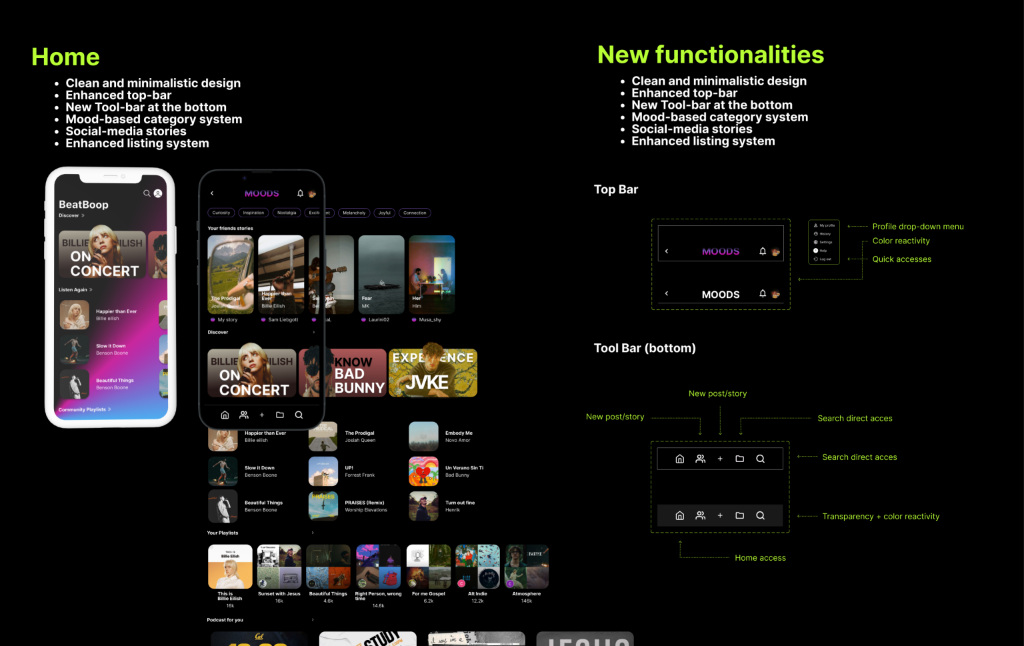
Home
The Home screen received a comprehensive redesign to serve as the central hub for music discovery and social interaction:
- Clean and minimalistic design with enhanced visual hierarchy
- Enhanced top-bar with profile drop-down menu and quick accesses
- New Tool-bar at the bottom featuring new post/story creation and search direct access
- Mood-based category system for intuitive content organization
- Social-media stories prominently featured for community engagement
- Enhanced listing system showcasing personalized playlists and recommendations
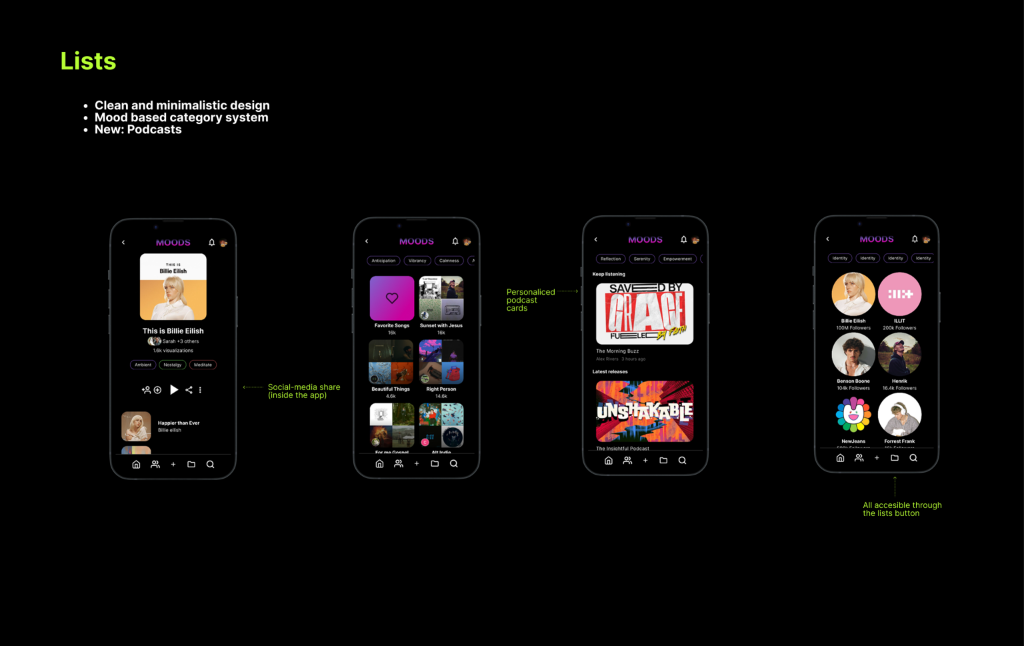
Lists
The Lists feature was refined to provide better organization and discoverability:
- Clean and minimalistic design with improved visual clarity
- Mood-based category system allowing users to organize playlists by emotional context
- New: Podcasts integration expanding content beyond music
- Personalized podcast cards with rich metadata and visual appeal
- Social-media share inside the app enabling seamless content sharing
- All accessible through the lists button in the bottom navigation
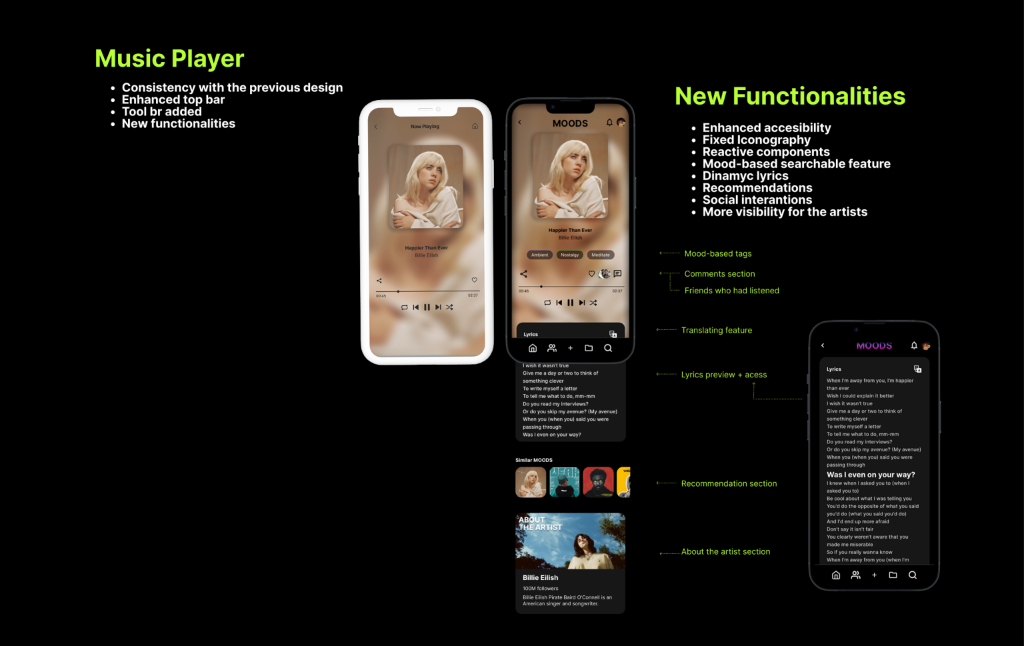
Music Player
The Music Player was enhanced while maintaining consistency with the previous design, adding powerful new functionalities:
- Consistency with the previous design ensuring familiarity
- Enhanced top bar with improved controls and visibility
- Tool bar added for quick access to key features
- New functionalities:
- Enhanced accessibility features
- Fixed iconography for better recognition
- Reactive components responding to user actions
- Lyrics preview with shareable feature
- Dynamic lyrics synchronized with playback
- Recommendations section with mood-based tags
- Social interactions: Comments section and friends who had listened
- More visibility for the artists with dedicated sections
Search Screens
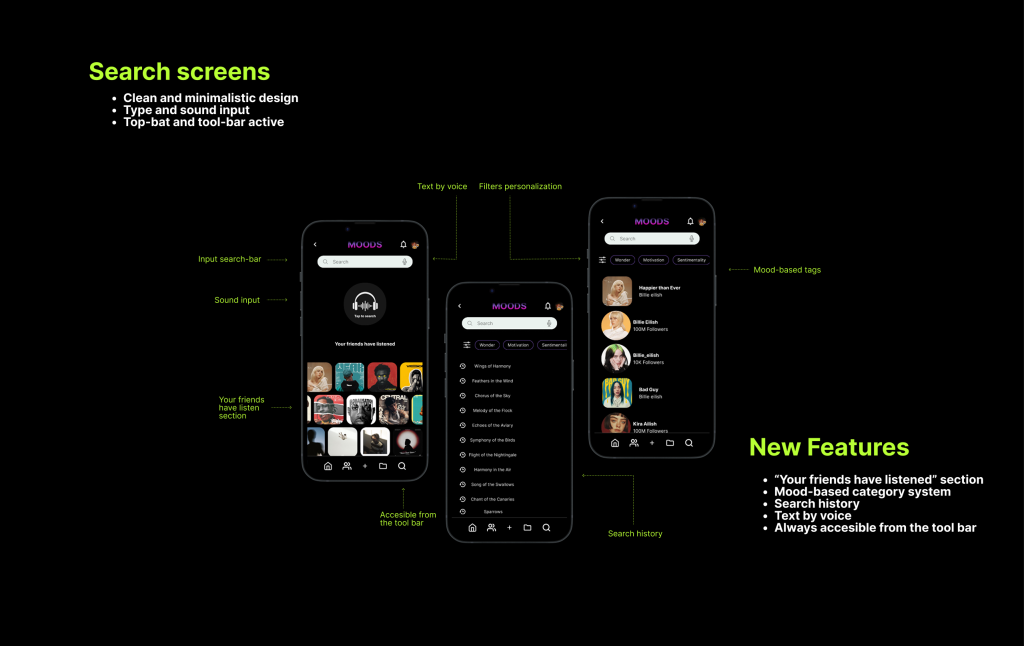
The Search screens were redesigned to provide a clean, fast, and social experience, prioritizing accessibility and flexible input methods:
- Clean and minimalistic design focusing on usability and content discovery.
- Enhanced accessibility with the top-bar and tool-bar always active.
- Flexible input methods: Supports standard text input and sound input (Text by voice).
- Mood-based tags/category system for searching and filtering content by emotional context, genre, or activity.
- New Feature: "Your friends have listened" section which leverages social interaction to drive music discovery.
- Search history visible for quick access to previous queries.
- Filters personalization available to refine search results.
- Always accessible from the tool bar, ensuring the search function is only one tap away from any screen.
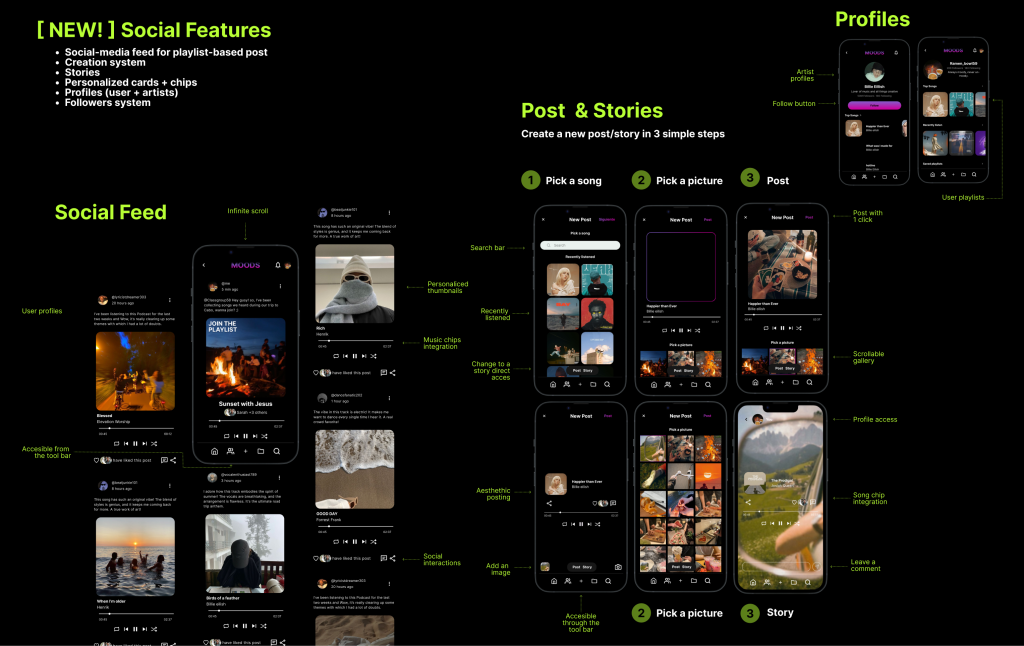
Social Features, Posts & Stories
The application introduces a complete suite of [NEW!] Social Features to foster community engagement and personalized content sharing. These features are centered around a dedicated social feed and an intuitive content creation system:
- Social-media feed designed for playlist-based posts with an infinite scroll.
- Post & Stories Creation system allowing users to create content in a simple, three-step process: 1) Pick a song, 2) Pick a picture, 3) Post or 3) Story.
- Content creation includes options for aesthetic posting, adding images, and song chip integration for stories.
- The Social Feed displays User profiles and supports Social interactions (sharing, liking, commenting) directly within the music experience.
- The feed is Accessible from the tool bar and includes a search bar for discovery.
- Stories and Post content are easily Accessible through the tool bar.
- Personalized cards + chips (Music chips) are integrated into the feed for quick actions and music context.
- Profiles (User + artists) are introduced, featuring User playlists and the ability to Post with 1 click on the post.
- A Followers system is implemented, alongside a Follow button on Artist profiles, enhancing the community structure.
- The User Profile allows for Profile access and displays content in a visually appealing, scrollable gallery.